
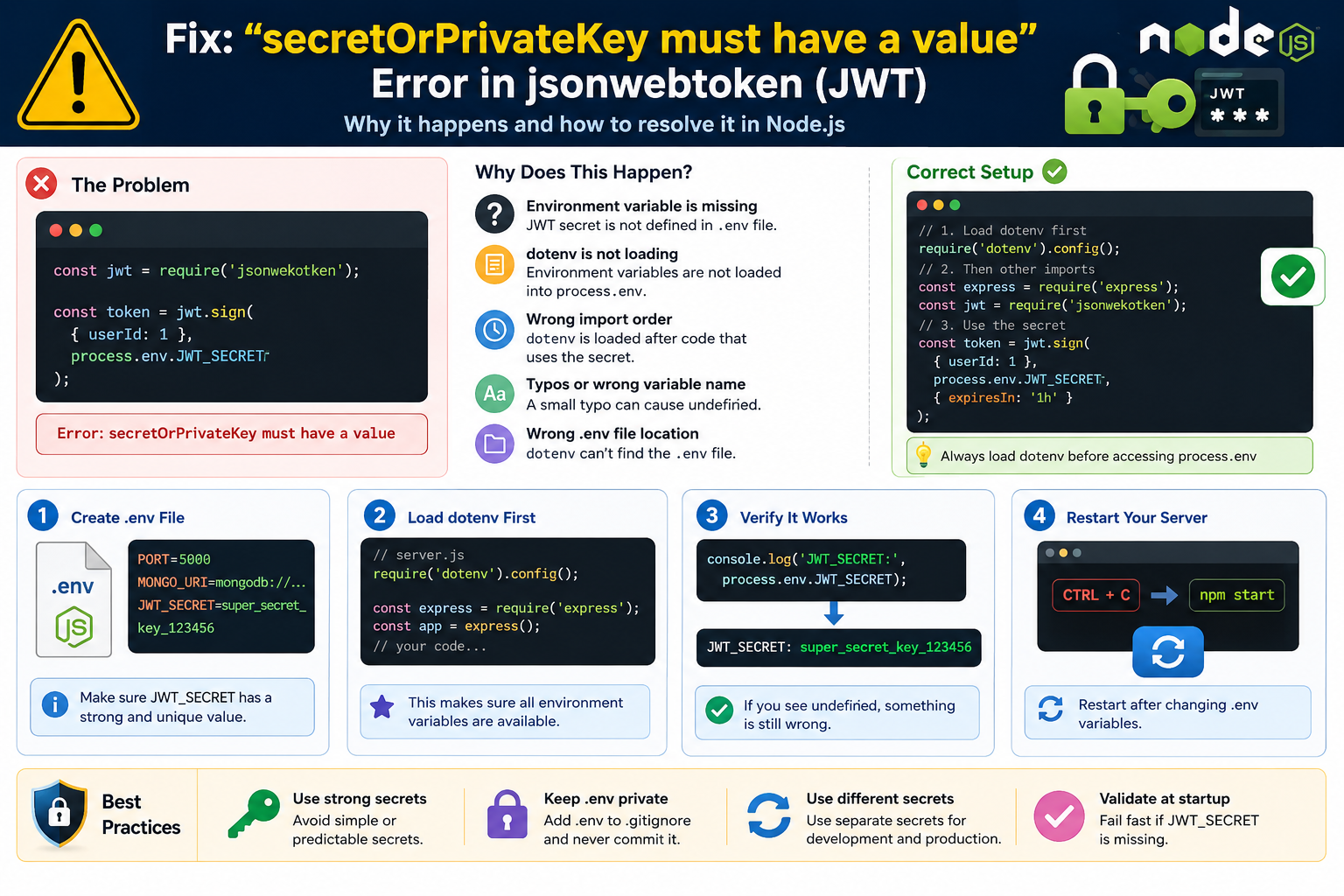
Learn how to fix the “secretOrPrivateKey must have a value” error in jsonwebtoken (JWT). Discover why process.env becomes undefined, how to properly configure dotenv, and avoid common Node.js authentication mistakes.. You’re building authentication for your Node.js application, everything looks correct, and then your server crashes with:
Error: secretOrPrivateKey must have a valueIt’s one of the most common JWT-related errors developers encounter.
What’s frustrating is that the actual problem is often nowhere near the line where the error appears. The issue usually originates from a missing environment variable, an incorrectly configured .env file, or a startup sequence problem.
After helping developers troubleshoot authentication systems and debugging countless Express.js projects, I’ve found that this error can usually be traced back to one simple fact:
JWT is trying to use a secret key that doesn’t exist at runtime.
The good news is that once you understand how JWT and environment variables work together, the fix typically takes only a few minutes.
This guide walks through the most common causes, proven fixes, and practical debugging techniques you can use in both development and production environments.
Table of Contents
- What Does the Error Mean?
- Why JWT Requires a Secret Key
- The Most Common Causes
- How to Fix the Error Step by Step
- Real-World Debugging Example
- Common Developer Mistakes
- Production Deployment Issues
- Quick Troubleshooting Checklist
- Security Best Practices
- FAQ
- Final Takeaway
What Does “secretOrPrivateKey Must Have a Value” Mean?
The error occurs when the jsonwebtoken package receives an empty, null, or undefined secret key while generating or verifying a token.
For example:
const jwt = require("jsonwebtoken");

const token = jwt.sign(
  { userId: 1 },
  process.env.JWT_SECRET
);
If process.env.JWT_SECRET returns:
undefinedJWT has no secret available for signing the token, so it immediately throws an error.
Quick Answer
If you’re looking for the fastest explanation:
The JWT secret is missing, undefined, or not loaded when your application starts.
Why JWT Requires a Secret Key
JWT (JSON Web Token) uses a secret key to create a cryptographic signature.
That signature allows your application to verify that a token hasn’t been modified.
A simplified JWT signing process looks like this:
jwt.sign(payload, secretKey);Without the secret key:
- Tokens cannot be signed
- Existing tokens cannot be verified
- Authentication becomes unreliable
Rather than creating insecure tokens, the library stops execution and throws the error.
This behavior is intentional and protects your application’s security.
The Most Common Causes of This Error
Although the error message always looks the same, the root cause can vary.
1. The Environment Variable Doesn’t Exist
A surprisingly common mistake is simply forgetting to define the JWT secret.
Example:
PORT=5000
DATABASE_URL=mongodb://localhost
Missing:
JWT_SECRET=my-secret-keySince the variable doesn’t exist, Node.js returns undefined.
2. dotenv Is Not Being Loaded
Creating a .env file isn’t enough.
Node.js won’t automatically read environment variables from that file unless you explicitly load them.
Install dotenv:
npm install dotenvThen load it:
require("dotenv").config();Without this step, environment variables inside .env remain unavailable.
3. dotenv Loads Too Late
This issue catches many developers.
Consider this example:
const jwt = require("jsonwebtoken");

const token = jwt.sign(
  payload,
  process.env.JWT_SECRET
);

require("dotenv").config();
By the time dotenv loads, JWT has already tried to access the secret.
Always initialize dotenv before any code that depends on environment variables.
Correct approach:
require("dotenv").config();

const express = require("express");
const jwt = require("jsonwebtoken");
4. A Typo in the Variable Name
Even experienced developers lose time to simple spelling mistakes.
.env
JWT_SECRET=mysecretApplication code:
process.env.JWT_SECRETTThat extra letter is enough to trigger the error.
When troubleshooting, compare names character by character.
5. The .env File Is in the Wrong Location
In most projects, the .env file belongs in the root directory.
Example:
project/
│
├── src/
├── controllers/
├── .env
├── package.json
└── server.js
If the file is placed elsewhere, dotenv may not find it unless you explicitly provide a path.
How to Fix the Error Step by Step
Follow these checks in order.
Most developers find the problem before reaching step four.
Step 1: Verify the Secret Exists
Open your .env file and confirm that the variable is present.
JWT_SECRET=super_secret_key_123Avoid blank values:
JWT_SECRET=Step 2: Load dotenv at the Top of Your Application
Your entry file should start with:
require("dotenv").config();This should appear before imports that rely on environment variables.
Step 3: Confirm the Variable Is Available
Add a temporary debug statement:
console.log(process.env.JWT_SECRET);Expected output:
super_secret_key_123If you see:
undefinedyou’ve already found the source of the problem.
Step 4: Restart Your Server
Many developers overlook this step.
Changes made to .env files are not automatically detected by Node.js.
After editing:
CTRL + CThen restart:
npm startor
nodemon server.jsStep 5: Validate the Secret During Startup
A simple validation check can save hours of debugging later.
if (!process.env.JWT_SECRET) {
  throw new Error(
    "JWT_SECRET environment variable is missing"
  );
}
This causes the application to fail immediately with a clear message.
Real-World Debugging Example
A developer recently deployed an Express API to a VPS.
Everything worked perfectly on localhost.
Authentication broke immediately after deployment.
The JWT code was correct:
jwt.sign(user, process.env.JWT_SECRET);The problem?
The production server never received the environment variable.
Running:
console.log(process.env.JWT_SECRET);returned:
undefinedAfter adding the variable to the server environment and restarting the application, authentication began working again.
This is one of the most common deployment-related JWT issues.
Common Developer Mistakes
Forgetting to Restart the Application
Node.js reads environment variables during startup.
Updating .env without restarting means the application continues using old values.
Using Different Variable Names
Example:
JWT_SECRET=mysecretBut:
process.env.SECRET_KEYThese must match exactly.
Hardcoding Secrets During Development
Many developers temporarily write:
jwt.sign(payload, "secret123");Then forget to replace it later.
This creates security risks and often causes inconsistencies between environments.
Committing .env Files to GitHub
Never store secrets in public repositories.
Add:
.envto your .gitignore file.
Production Deployment Issues
If the application works locally but fails after deployment, investigate the hosting environment first.
Common platforms that require manual environment variable configuration include:
- VPS servers
- Docker containers
- AWS
- Google Cloud
- Azure
- Railway
- Render
- Hostinger VPS
A local .env file is not automatically transferred to production.
Many authentication failures stem from this misunderstanding.
Quick Troubleshooting Checklist
When you see:
secretOrPrivateKey must have a valuecheck the following:
✅ .env file exists
✅ JWT_SECRET is defined
✅ dotenv is installed
✅ dotenv loads before application code
✅ Variable names match exactly
✅ Server restarted after changes
✅ No spelling mistakes
✅ Environment variables configured in production
✅ console.log(process.env.JWT_SECRET) returns a value
Security Best Practices for JWT Secrets
Use Strong Random Secrets
Avoid:
JWT_SECRET=12345Prefer:
JWT_SECRET=f8@2#KlmP!9QwR7xNn$4TyZSeparate Development and Production Secrets
Never reuse the same secret everywhere.
Different environments should have unique values.
Validate Secrets During Startup
Failing early is better than discovering authentication issues after users start logging in.
Rotate Secrets When Necessary
If a secret becomes exposed, replace it immediately and invalidate affected tokens.
Frequently Asked Questions
Why is process.env.JWT_SECRET undefined?
Usually because:
- dotenv isn’t loaded
- the variable doesn’t exist
- the variable name is incorrect
- the server wasn’t restarted
- the production environment wasn’t configured
Does JWT Require dotenv?
No.
JWT only needs a secret string.
dotenv is simply a convenient way to manage environment variables.
Can I Hardcode the Secret?
Yes, technically.
jwt.sign(payload, "mysecret");However, this is not recommended for production applications because secrets become visible in source code.
Why Does It Work Locally but Not in Production?
Most hosting providers do not automatically import your local .env file.
You must manually configure environment variables through your hosting platform.
What’s the Fastest Way to Diagnose the Problem?
Run:
console.log(process.env.JWT_SECRET);If the output is undefined, focus on your environment variable configuration first.
Final Takeaway
The “secretOrPrivateKey must have a value” error isn’t really a JWT problem—it’s usually a configuration problem.
In most cases, JWT is behaving exactly as it should. It’s refusing to create or verify tokens because no valid secret key is available.
Whenever this error appears:
- Check your
.envfile. - Verify dotenv is loading correctly.
- Confirm the variable name matches exactly.
- Restart the application.
- Test
process.env.JWT_SECRET.
Following those five steps resolves the vast majority of JWT secret-related issues in Node.js applications.
Once your environment variables are configured correctly, the error disappears, authentication works as expected, and your application becomes much easier to maintain and deploy.
How to Fix Supabase AuthApiError: “Database Error Finding User” During Signup – knowabteverything
check official website for node .js Index | Node.js v26.3.1 Documentation