
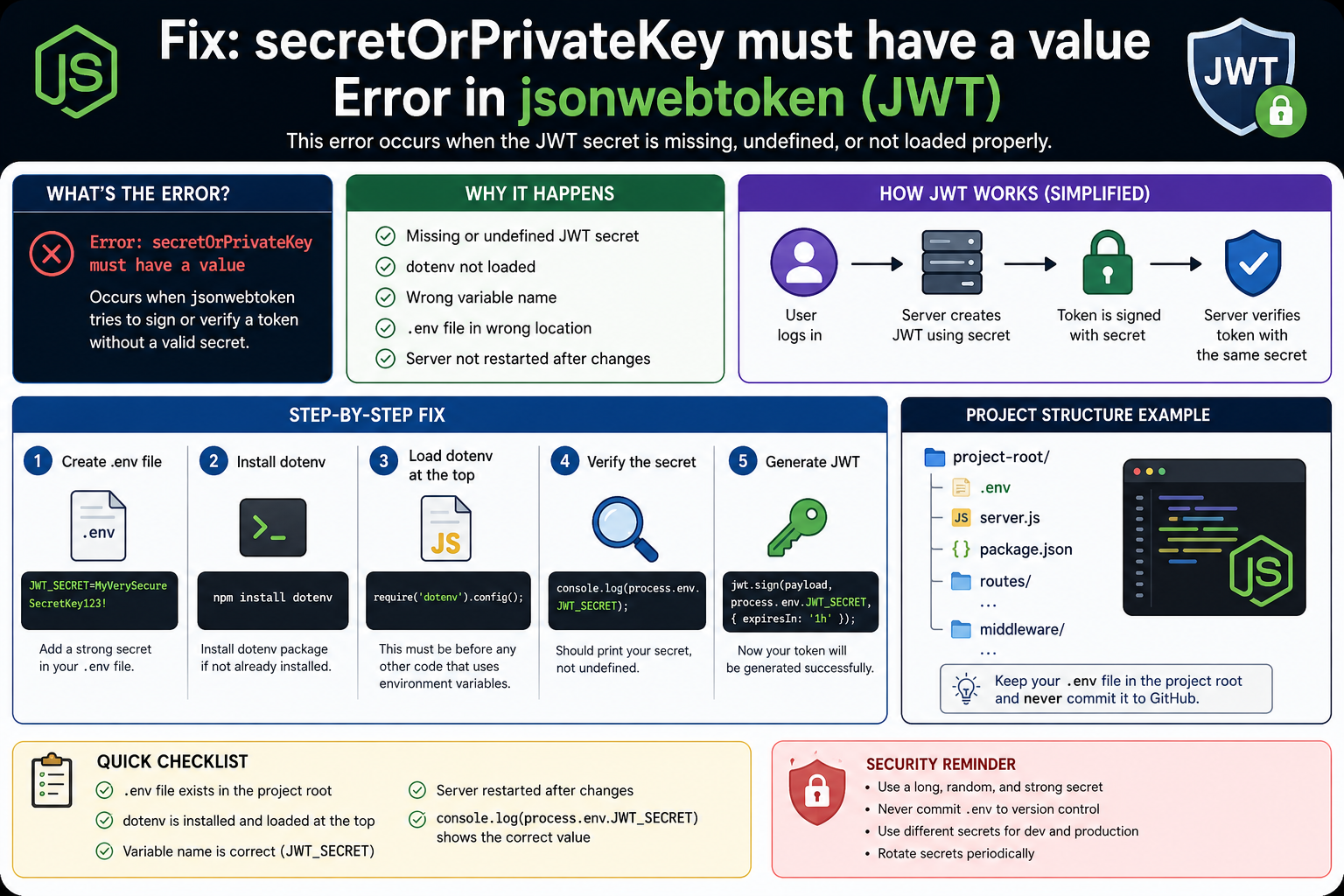
How to Fix the “secretOrPrivateKey Must Have a Value” Error in JWT (jsonwebtoken). A practical guide for Node.js developers dealing with missing JWT secrets, environment variable issues, and dotenv configuration problems.
Introduction
Few authentication errors in Node.js are as common—and as frustrating—as this one:
Error: secretOrPrivateKey must have a value
The error usually appears when you’re generating or verifying JSON Web Tokens (JWTs) with the jsonwebtoken package.
The confusing part is that your code often looks perfectly fine. The JWT library is installed, the syntax is correct, and yet the application crashes the moment you try to sign a token.
After helping developers troubleshoot this issue across Express APIs, authentication systems, and production deployments, I’ve found that the root cause is almost always the same:
Your JWT secret is missing, undefined, or not being loaded correctly.
Most of the time, the problem has nothing to do with JWT itself. Instead, it comes from:
- A missing
.envfile - Incorrect environment variable names
- Dotenv not loading properly
- Configuration being loaded in the wrong order
This guide explains exactly why the error happens, how to identify the real cause, and the fastest ways to fix it.
Table of Contents
- What Does This Error Actually Mean?
- Why JWT Requires a Secret Key
- The Most Common Causes
- How to Fix the Error Step by Step
- How to Verify Your Environment Variables
- Real-World Debugging Example
- Common Mistakes Developers Make
- Security Best Practices
- FAQ
- Final Takeaway
What Does “secretOrPrivateKey Must Have a Value” Mean?
JWT tokens are digitally signed before they’re sent to users.
When you call:
jwt.sign(payload, secret);
the secret parameter cannot be empty.
For example:
const token = jwt.sign(
  { userId: 1 },
  process.env.JWT_SECRET
);
If process.env.JWT_SECRET returns undefined, the JWT library has no secret available to create a valid signature.
As a result, it throws:
Error: secretOrPrivateKey must have a value
This is actually a helpful security feature. The library refuses to generate tokens that cannot be securely verified later.
Why JWT Requires a Secret Key
Think of a JWT secret as the master key that protects your authentication system.
Whenever a user logs in:
- The server creates a token.
- The token is signed using the secret key.
- Future requests use that token.
- The server verifies the signature using the same secret.
Without a secret key:
- Tokens can’t be trusted.
- Users can’t be authenticated safely.
- Anyone could potentially forge tokens.
That’s why the jsonwebtoken package immediately stops execution when the secret is missing.
The Most Common Causes of the Error
1. Environment Variable Is Undefined
This is the cause in most cases.
You may have code like:
jwt.sign(payload, process.env.JWT_SECRET);
But when you check:
console.log(process.env.JWT_SECRET);
You get:
undefined
At that point, JWT is working correctly. The environment variable simply isn’t available.
2. Dotenv Was Never Loaded
A surprisingly common oversight.
You installed dotenv:
npm install dotenv
But forgot to initialize it:
require('dotenv').config();
Without this line, Node.js never reads your .env file.
3. The Variable Name Doesn’t Match
Consider this .env file:
JWT_SECRET=mySuperSecretKey
And this code:
process.env.JWTSECRET
Notice the missing underscore.
Node.js treats those as completely different names.
Even a small typo will result in an undefined value.
4. The .env File Is in the Wrong Location
A standard project structure looks like this:
project/
│
├── .env
├── package.json
├── server.js
If the .env file is inside another folder, dotenv may not find it automatically.
5. The Server Wasn’t Restarted
This catches many developers during testing.
You update:
JWT_SECRET=myNewSecret
But the running server still uses the old environment configuration.
Always restart your application after changing environment variables.
How to Fix the Error Step by Step
Step 1: Create a JWT Secret
Inside your .env file:
JWT_SECRET=MyVerySecureSecretKey
For production projects, generate a long, random value rather than using simple words or numbers.
Step 2: Install Dotenv
If you haven’t already:
npm install dotenv
Step 3: Load Dotenv Before Anything Else
One of the most important details is loading dotenv before you access any environment variables.
Correct:
require('dotenv').config();

const express = require('express');
const jwt = require('jsonwebtoken');
Incorrect:
const secret = process.env.JWT_SECRET;

require('dotenv').config();
By the time dotenv loads, the value has already been read as undefined.
Step 4: Verify the Secret Is Available
Before generating tokens, check:
console.log(process.env.JWT_SECRET);
You should see:
MyVerySecureSecretKey
If you see:
undefined
the problem is still in your environment configuration.
Step 5: Generate the Token
Once the secret loads correctly:
const token = jwt.sign(
  { id: 1 },
  process.env.JWT_SECRET,
  { expiresIn: '1h' }
);
The error should disappear.
A Real-World Debugging Scenario
Let’s say you’re building a login API using Express.
Everything looks fine:
const token = jwt.sign(
  { email: user.email },
  process.env.JWT_SECRET
);
Your .env file exists:
JWT_SECRET=mySecretKey123
Yet every login request fails with:
Error: secretOrPrivateKey must have a value
After 20 minutes of checking JWT documentation, you finally add:
console.log(process.env.JWT_SECRET);
Output:
undefined
At that moment, the problem becomes obvious.
You realize dotenv was never loaded:
require('dotenv').config();
Add that line, restart the server, and the login system immediately starts working.
This exact scenario happens so often that it’s usually the first thing experienced Node.js developers check.
How to Quickly Diagnose the Problem
When you encounter this error, run through this checklist:
Check 1
console.log(process.env.JWT_SECRET);
If it’s undefined, continue debugging.
Check 2
Verify dotenv loads before all imports that use environment variables.
Check 3
Confirm the .env file exists in the project root.
Check 4
Double-check the variable name for spelling mistakes.
Check 5
Restart the application after making changes.
These five checks solve the overwhelming majority of JWT secret errors.
Common Mistakes Developers Make
Hardcoding Secrets During Testing
Some developers temporarily do this:
jwt.sign(payload, "secret123");
It works, but it creates bad habits and can accidentally reach production.
Use environment variables from the start.
Committing .env Files to GitHub
A leaked JWT secret can compromise an entire authentication system.
Always include:
.env
inside .gitignore.
Using Weak Secrets
Avoid values like:
JWT_SECRET=12345
or
JWT_SECRET=password
Use long, random strings that are difficult to guess.
Loading Configuration Too Late
The order of initialization matters.
A correctly configured application loads environment variables before routes, authentication middleware, or database connections.
Security Best Practices for JWT Secrets
If you’re fixing this error in a production application, take a moment to improve security as well.
Recommended practices:
- Store secrets in environment variables.
- Use different secrets for development and production.
- Rotate secrets periodically.
- Never expose secrets in source code.
- Use secret management tools in cloud environments.
- Restrict access to deployment configurations.
A secure JWT implementation is just as important as a working one.
Frequently Asked Questions
Why is process.env.JWT_SECRET undefined?
The most common reasons are:
- Dotenv isn’t loaded.
- The variable name is incorrect.
- The
.envfile is missing. - The server needs restarting.
Does JWT work without a secret?
No.
JWT signing requires either:
- A secret key (HMAC algorithms)
- A private key (RSA or asymmetric algorithms)
Without one, token creation fails.
How can I verify dotenv is working?
Run:
console.log(process.env.JWT_SECRET);
If the expected value appears in the console, dotenv is loading correctly.
Can I store my JWT secret directly in code?
You can, but it’s strongly discouraged.
Environment variables provide better security, easier deployment, and cleaner configuration management.
Why does the error appear after deployment but not locally?
This usually means the production server doesn’t have the required environment variable configured.
Check your hosting platform’s environment settings and confirm that JWT_SECRET exists.
Final Takeaway
The “secretOrPrivateKey must have a value” error isn’t really a JWT problem—it’s a configuration problem.
Whenever you see it, focus on one question:
Is my JWT secret actually available at runtime?
Start by checking process.env.JWT_SECRET. If it’s undefined, verify your .env file, load dotenv correctly, check variable names, and restart the server.
In real-world Node.js projects, those simple checks solve this error far more often than rewriting authentication code or changing JWT libraries.
Once your secret loads correctly, JWT authentication usually works exactly as expected.
Read about How to Fix Supabase AuthApiError: “Database Error Finding User” During Signup – knowabteverything