
The Ultimate Supabase Mobile Development Guide A few years ago, building a mobile app meant spending almost as much time on backend infrastructure as on the app itself.
You needed user authentication, APIs, databases, file storage, security rules, and sometimes real-time updates. Even a simple app could require several services stitched together before users ever saw the first screen.
That’s one reason Supabase has become so popular among mobile developers.
It gives you a production-ready backend built on PostgreSQL while handling authentication, storage, APIs, and real-time features out of the box. Instead of spending weeks building backend systems, you can focus on creating a better user experience.
I’ve seen developers launch MVPs, internal business tools, chat applications, and marketplace apps significantly faster with Supabase because most of the essential infrastructure is already in place.
If you’re searching for a complete Supabase mobile app tutorial, this guide will walk you through everything you need to know—from setup to security and real-world deployment considerations.
Table of Contents
- What Is Supabase?
- Why Mobile Developers Are Choosing Supabase
- Creating Your First Supabase Project
- Supabase Flutter Setup Guide
- Supabase React Native Expo Tutorial
- Supabase SwiftUI Integration
- Supabase for Kotlin Android Apps
- Authentication and Deep Linking
- File Storage and Image Uploads
- Real-Time Features
- Row Level Security Explained
- Offline Sync Strategies
- Common Mistakes to Avoid
- Real-World App Architecture
- FAQ
- Final Thoughts
What Is Supabase?
Supabase is an open-source backend platform that provides many of the services mobile applications need in one place.
At its core is PostgreSQL, one of the most trusted relational databases in the world.
On top of that database, Supabase adds:
- User authentication
- Automatically generated APIs
- File storage
- Real-time subscriptions
- Edge Functions
- Security policies
- Developer tools and dashboards
Many developers describe it as an open-source Firebase alternative, but that comparison only tells part of the story.
The biggest difference is that Supabase is built around SQL and PostgreSQL, which makes it feel familiar to developers coming from traditional web or backend development.
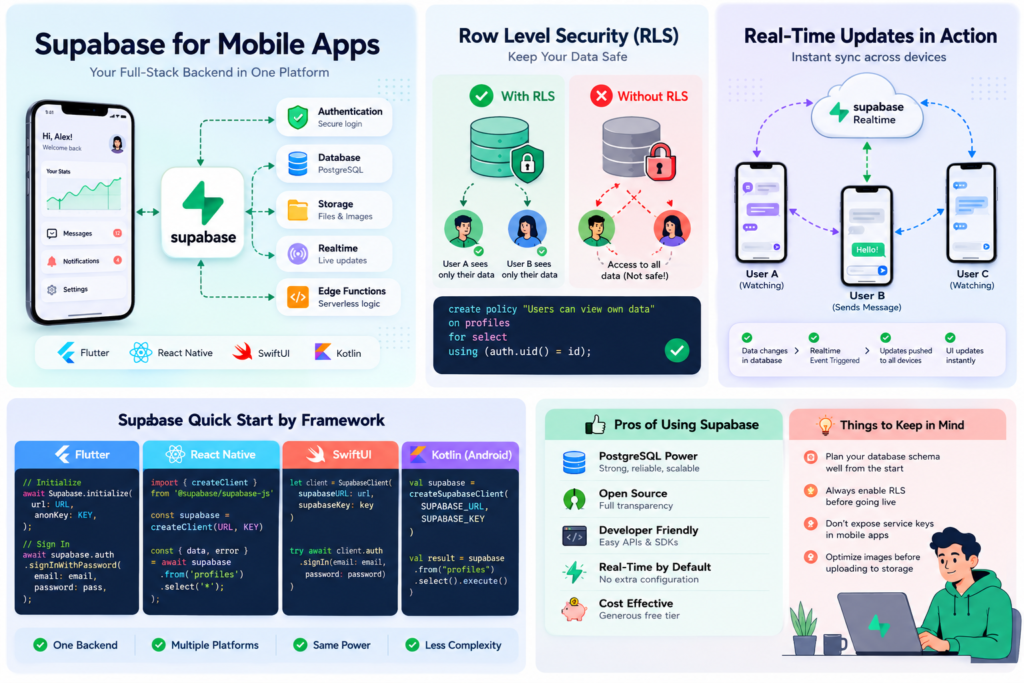
Why Mobile Developers Are Choosing Supabase
Mobile development has changed dramatically.
Teams are expected to build faster while supporting multiple platforms, including Android, iOS, Flutter, and React Native.
Supabase helps by removing much of the backend workload.
Faster Development Cycles
Instead of building:
- Authentication services
- REST APIs
- Database infrastructure
- File upload systems
you can start building app features almost immediately.
PostgreSQL Instead of NoSQL
Many developers prefer working with relational data.
For example:
A fitness app might need relationships between:
- Users
- Workouts
- Exercise history
- Goals
- Progress tracking
Handling these relationships in PostgreSQL is often more intuitive than restructuring everything into NoSQL collections.
Transparent Pricing and Open Source
One concern many startups have is vendor lock-in.
Because Supabase is open source, you have more flexibility if your infrastructure needs change later.
Creating Your First Supabase Project
Getting started takes less than ten minutes.
Step 1: Create a Project
After signing up, create a new project and select:
- Project name
- Region
- Database password
Choose a region close to your users whenever possible to reduce latency.
Step 2: Create Your First Table
For a simple profile system:
create table profiles (
  id uuid primary key,
  full_name text,
  avatar_url text,
  created_at timestamp default now()
);
Step 3: Enable Authentication
Authentication is available immediately.
You can enable:
- Email login
- Magic links
- Google Sign-In
- Apple Sign-In
- Phone authentication
Step 4: Copy Your Project Credentials
From the API settings page, copy:
- Project URL
- Anonymous Key
You’ll use these in your mobile application.
Supabase Flutter Setup Guide
Flutter is one of the most popular frameworks used with Supabase today.
The integration is straightforward.
Install the Package
dependencies:
  supabase_flutter: latest_version
Initialize Supabase
await Supabase.initialize(
  url: 'YOUR_PROJECT_URL',
  anonKey: 'YOUR_ANON_KEY',
);
Create a User Account
await supabase.auth.signUp(
  email: email,
  password: password,
);
Retrieve Data
final profiles =
await supabase
.from('profiles')
.select();
Where Flutter and Supabase Work Best
This combination is particularly effective for:
- Social applications
- Event apps
- Chat systems
- Startup MVPs
- Community platforms
Because Flutter already provides rapid UI development, pairing it with Supabase often results in very short development cycles.
Supabase React Native Expo Tutorial
React Native developers often choose Supabase because it requires minimal configuration.
Install the SDK
npm install @supabase/supabase-js
Create a Client
const supabase = createClient(
  SUPABASE_URL,
  SUPABASE_ANON_KEY
);
Insert Data
await supabase
.from('profiles')
.insert({
  name: 'John'
});
Fetch Records
const { data } =
await supabase
.from('profiles')
.select('*');
Practical Example
Imagine building a restaurant ordering app.
Supabase can manage:
- Customer accounts
- Orders
- Menu items
- Reviews
- Uploaded food images
without requiring a custom backend team.
Supabase SwiftUI Native Integration
Native iOS developers can integrate Supabase directly into SwiftUI projects.
Install the SDK
Using Swift Package Manager:
https://github.com/supabase/supabase-swift
Configure the Client
let client = SupabaseClient(
    supabaseURL: url,
    supabaseKey: key
)
Authenticate a User
try await client.auth.signIn(
    email: email,
    password: password
)
Swift’s modern async/await syntax makes the integration feel natural and easy to maintain.
Supabase Kotlin Android Backend Setup
Android developers working with Kotlin receive a similarly smooth experience.
Add Dependency
implementation("io.github.jan-tennert.supabase")
Create a Client
val supabase = createSupabaseClient(
    supabaseUrl,
    supabaseKey
)
Query Data
val result =
supabase.from("profiles")
.select()
The consistency across Flutter, React Native, Swift, and Kotlin is one of Supabase’s strongest advantages.
Authentication and Deep Linking
Authentication is usually the first backend feature users interact with.
Supabase supports:
- Email and password login
- Magic links
- Google Sign-In
- Apple Sign-In
- GitHub login
- Phone authentication
For mobile applications, deep linking is especially important.
Why Deep Linking Matters
Consider this common flow:
- User creates an account
- Verification email arrives
- User taps the verification link
- App opens automatically
- User is logged in
Without proper deep linking, users often end up in a browser and become confused.
Small usability improvements like this can have a surprisingly large impact on user retention.
Uploading Profile Pictures and Files
Most production applications eventually need file storage.
Common examples include:
- Profile photos
- Product images
- PDFs
- Videos
- Documents
Upload Example
await supabase.storage
.from('avatars')
.upload(
  'avatar.png',
  file
);
A Useful Optimization
Many developers upload full-resolution images directly from mobile devices.
This increases:
- Storage costs
- Upload times
- Data usage
Compressing images before upload usually provides a much better experience.
Real-Time Features
One of Supabase’s most impressive capabilities is real-time data synchronization.
Whenever data changes, connected devices can receive updates instantly.
Common Use Cases
- Messaging apps
- Team collaboration tools
- Live dashboards
- Order tracking
- Multiplayer experiences
Flutter Subscription Example
supabase
.channel('public:messages')
.onPostgresChanges(
event: PostgresChangeEvent.all,
schema: 'public',
table: 'messages',
callback: (payload) {
  print(payload);
})
.subscribe();
For users, this creates the feeling that the application is always up to date.
Understanding Row Level Security (RLS)
If there’s one feature every mobile developer should understand before launching, it’s Row Level Security.
RLS determines exactly which rows a user can access.
Without it, users may accidentally gain access to information they should never see.
Example Policy
create policy
"Users can view own profile"
on profiles
for select
using (
auth.uid() = id
);
This policy ensures users only access their own records.
Many security issues in mobile apps come from misconfigured permissions rather than coding mistakes.
Handling Offline Sync with Supabase Mobile
Real users don’t always have perfect internet connections.
They lose signal in elevators, airports, rural areas, and underground transportation systems.
A good mobile app should continue functioning whenever possible.
Recommended Approach
Store critical data locally using:
Flutter
- Hive
- Isar
- SQLite
React Native
- AsyncStorage
- SQLite
iOS
- Core Data
Android
- Room Database
Then synchronize changes once connectivity returns.
Real-World Example
A field technician recording inspection reports may spend hours without internet access.
Local storage allows work to continue uninterrupted, while synchronization occurs later in the background.
Common Mistakes Developers Make
Launching Without RLS
Security should never be an afterthought.
Configure security policies before releasing your app.
Exposing Service Keys
Only public anonymous keys belong in mobile applications.
Service keys should remain private.
Ignoring Database Design
A poorly designed database can become difficult to maintain as your application grows.
Spend time planning relationships early.
Uploading Unoptimized Media
Large files hurt performance and increase infrastructure costs.
Forgetting Error States
Users experience:
- Weak internet
- Timeouts
- Expired sessions
- Failed uploads
Your app should handle these situations gracefully.
A Real-World Mobile App Architecture Example
Imagine you’re building a local marketplace app.
Users can buy and sell second-hand items within their city.
Authentication
Supabase Auth manages registration and login.
Profiles
PostgreSQL stores user information.
Images
Storage handles product photos.
Messaging
Real-time subscriptions power buyer-seller conversations.
Security
Row Level Security protects private data.
This architecture can support thousands of users while remaining relatively simple to maintain.
Frequently Asked Questions
Is Supabase a good Firebase alternative?
For developers who prefer PostgreSQL and SQL-based workflows, Supabase is an excellent alternative.
The right choice depends on your project’s requirements and team experience.
Can Supabase handle production workloads?
Yes.
Many startups and growing businesses run production applications on Supabase.
Does Supabase support Flutter?
Absolutely.
Flutter is one of the most widely used mobile frameworks in the Supabase ecosystem.
Is Supabase free?
The free tier is generous enough for learning, prototypes, and many MVP projects.
Larger applications typically move to paid plans as usage grows.
Does Supabase support real-time updates?
Yes.
Real-time subscriptions are built directly into the platform.
Can Supabase work offline?
Offline functionality requires local storage solutions, but it can be implemented effectively using an offline-first architecture.
Final Thoughts
Supabase has matured into one of the most developer-friendly backend platforms available for mobile applications.
Whether you’re building with Flutter, React Native, SwiftUI, or Kotlin, it provides the core services most apps need—authentication, databases, storage, real-time updates, and security—without forcing you to manage complex backend infrastructure.
What makes Supabase particularly appealing isn’t just the feature set. It’s the balance between speed and flexibility. You can launch quickly, yet still retain the power of PostgreSQL and full control over your data model as your application grows.
For solo developers, startups, and even established teams, that combination is difficult to ignore.
If you’re starting a new mobile project today, building a small prototype with Supabase is one of the fastest ways to evaluate whether it fits your workflow. In many cases, you’ll discover that the backend work you expected to spend weeks building is already waiting for you.
How to Import Product Data into Supabase Using a CSV File (Without Writing SQL) – knowabteverything
How to Fix Supabase AuthApiError: “Database Error Finding User” During Signup – knowabteverything
Supabase | The Open Source Firebase Alternative

About Amish
Hi, I’m Amish, and developer.
I write practical React Native, Node.js, MongoDB, and Supabase tutorials based on real projects and testing.
[…] Read about The Ultimate Supabase Mobile Development Guide (Flutter, React Native & Swift) – knowabtev… […]
[…] Read about The Ultimate Supabase Mobile Development Guide (Flutter, React Native & Swift) – knowabtev… […]