Building an SOS Emergency Pipeline: From One Tap to Dispatch I’m building a local meetup app — the kind that connects you with people nearby who share your interests, so you can actually meet up in person. I’m not naming it publicly yet since it’s still a work in progress, but I want to start documenting the engineering behind it, starting with the piece I’m proudest of: the safety system.
Meeting a stranger from an app is one of those things everyone does now, but almost nobody talks about the actual risk. When I set out to build this, I knew safety couldn’t be a checkbox feature bolted on at the end. It had to be core infrastructure, on par with auth or the database itself.
The centerpiece of that is the SOS system: one tap (well, one hold), and a user’s location goes straight to their emergency contacts and to the app’s safety team, in real time.
Here’s how it actually works, and the mistakes I had to fix along the way.
The problem
The app connects people to meet up locally with others they’ve matched with — often strangers. That’s the whole point, but it’s also the obvious risk. If a meetup goes wrong, a user needs a way to get help immediately, without fumbling through menus or trying to explain their location over a phone call while something is actively happening.
So the requirement was simple to state and hard to build well: one clear action, that reliably and quickly gets the right people the right information.
That “right people” is two audiences at once — the user’s own emergency contacts, and the app’s internal Trust & Safety team — and both need to be reached without relying on a single point of failure (like the user’s phone having a strong signal for an app push notification).
The trigger: why hold, not tap
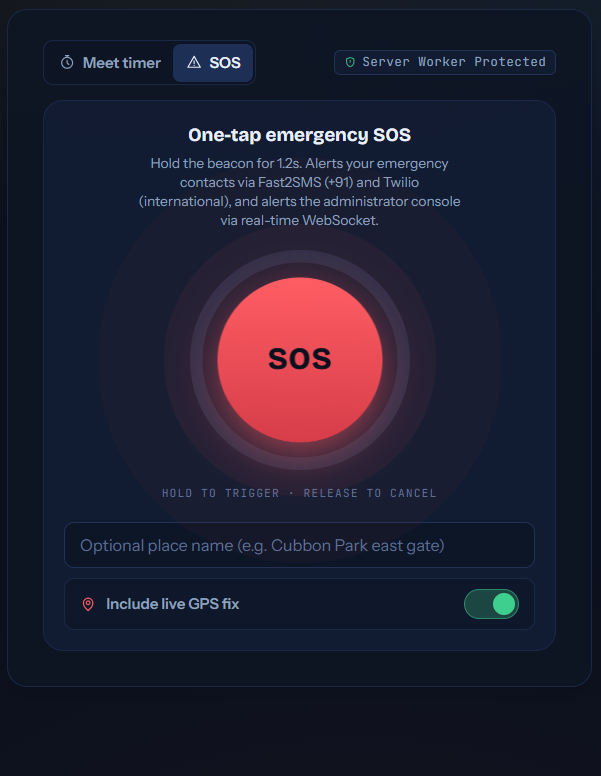
The SOS button isn’t a single tap — it’s a 1.2 second hold gesture. That was a deliberate decision, not a UI flourish. A single tap is too easy to hit by accident (in a pocket, during a normal conversation, while just navigating the app), and an accidental SOS trigger has a real cost: it panics an emergency contact and creates noise for the safety team.
A hold-to-arm gesture with visual feedback (a filling ring) solves that — it needs deliberate, sustained intent, but at 1.2 seconds it’s still fast enough to use under real stress.
const startHold = () => {
  firedRef.current = false;
  const t0 = performance.now();
  const loop = () => {
    const p = Math.min(1, (performance.now() - t0) / 1200);
    setHold(p);
    if (p >= 1) {
      if (!firedRef.current) {
        firedRef.current = true;
        setHold(0);
        void triggerSos({
          locationName: locName.trim() || 'Current Location',
          includeLocation: includeLoc,
          source: 'manual',
        });
      }
      return;
    }
    holdRef.current = requestAnimationFrame(loop);
  };
  holdRef.current = requestAnimationFrame(loop);
};
Using requestAnimationFrame instead of a setInterval here matters more than it looks — it keeps the ring animation smooth and ties the actual fire condition to elapsed wall-clock time (performance.now()) rather than a fixed tick count, so it stays accurate even if the browser throttles background timers.
Releasing early (onPointerUp / onPointerLeave) cancels the animation frame and resets the hold state without firing anything — so backing out is just as easy as triggering it.
What happens after the trigger
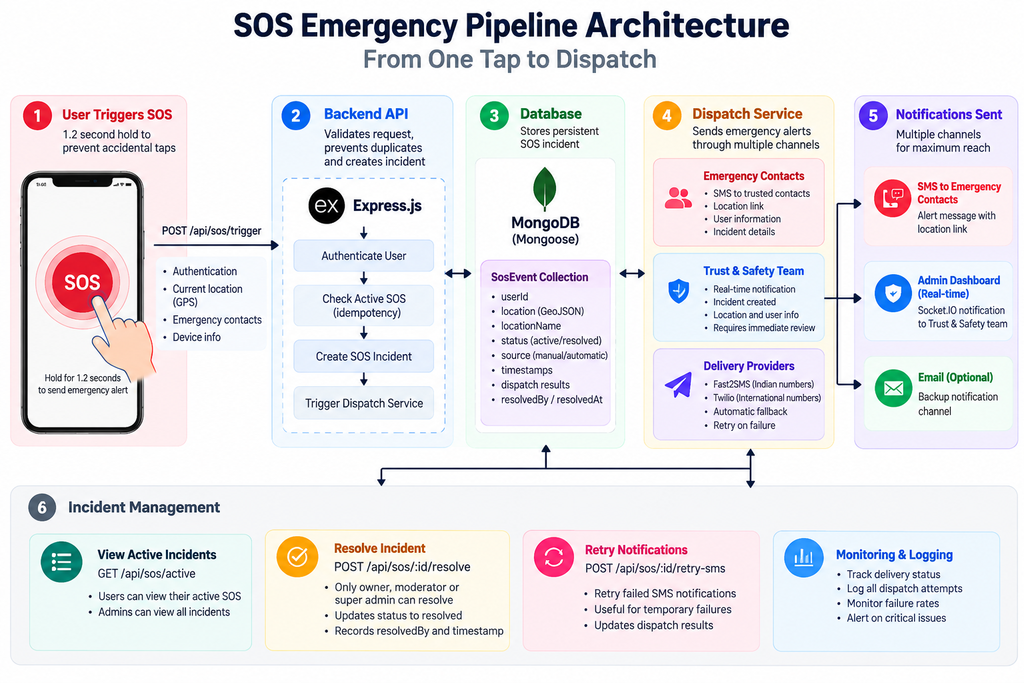
Once SOS fires, three things need to happen almost simultaneously:
- Emergency contacts get notified — via SMS, using Fast2SMS for Indian numbers (+91) and Twilio for international numbers. Two gateways instead of one, so a single provider outage doesn’t mean silence.
- The admin console gets a real-time alert — pushed over the existing Socket.IO gateway, the same one used for chat and presence, so the Trust & Safety team sees it appear live rather than on a polling delay.
- An incident record is created — so the SOS has a persistent, trackable state (
active,resolved,false_alarm) rather than being a fire-and-forget alert.
The location itself is optional but on by default — a user can choose to attach a live GPS fix or just a named location, which matters for cases where GPS isn’t reliable (indoors, dense urban areas) but the user can describe where they are.
The bug that actually mattered: SOS spam and idempotency
The first version of this feature had an obvious hole once I actually thought about it from an adversarial angle (or even just a panicking user’s): what happens if someone taps SOS multiple times in a row?
Under stress, someone might genuinely hold the button again because they’re not sure it worked. Without any safeguard, that creates duplicate incidents — which means duplicate SMS blasts to the same emergency contacts, and duplicate entries flooding the admin queue. Worst case, it looks like a spam attack instead of a real emergency, and the noise makes it harder for the safety team to act fast, not easier.
The fix was two-part:
1. Active-incident locking. A user can only have one active SOS incident at a time. If an SOS is already active, a repeat trigger doesn’t create a new incident — it’s treated as reinforcing the existing one, not spawning a duplicate.
2. Centralized dispatch logging. Every dispatch attempt — successful or not — gets written to a SosDeliveryLog, so there’s a clear audit trail of what was sent, to whom, and when. This also made it possible to see, after the fact, whether an SMS gateway failed silently instead of just hoping it worked.
3. Atomic state transitions. The incident’s status changes (active → resolved / false_alarm) needed to be atomic at the database level, not just “check then update” in application code — otherwise two near-simultaneous requests (say, the user resolving it from their phone while a timer-based escalation is also firing) could leave the incident in an inconsistent state.
None of this was in the first version. It only became obvious once I stopped thinking about the “happy path” — one clean SOS trigger — and started thinking about the messy, high-stress reality of how someone actually uses a panic button.
Resolving an incident
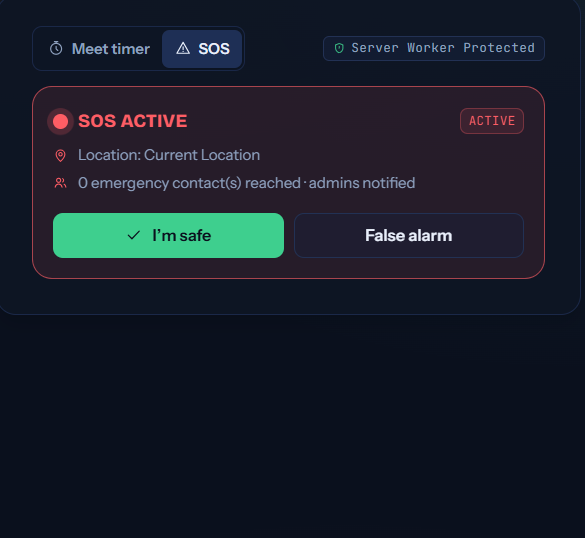
An active SOS isn’t just a fire-and-forget alert — it stays visible to the user as an active state until they explicitly resolve it:
<Btn tone="safe" onClick={() => onResolve('resolved')}>
  <I.check size={14} /> I'm safe
</Btn>
<Btn tone="outline" onClick={() => onResolve('false_alarm')}>
  False alarm
</Btn>
Distinguishing “resolved” from “false alarm” as separate outcomes (rather than one generic “cancel”) matters for the Trust & Safety side — it lets the admin console separate genuine incidents that were handled from accidental triggers, which is useful data for improving the trigger UX later.
What I’d tell someone building something similar
If you’re building any kind of safety-critical trigger in an app:
- Design for repeated/accidental triggers from day one. It’s not an edge case — it’s the normal way panic buttons get used.
- Don’t rely on a single delivery channel. One SMS gateway, one push notification service — any single point of failure defeats the purpose of an emergency system.
- Log everything, even failures. A dispatch that silently fails is worse than one that visibly fails, because you won’t know to fix it.
- Make the UI gesture match the stakes. A feature that can send real alerts to real people shouldn’t be one accidental tap away.
Important Part of code
Keep the idempotency check
const existing = await SosEvent.findOne({
userId: user._id,
status: ‘active’
});
if (existing) {
res.status(400).json({
error: ‘An active SOS emergency already exists for this account.’,
activeSosId: existing._id,
});
return;
}
the incident creation
const sos = await SosEvent.create({
userId: user._id,
source: source || ‘manual’,
location: coords
? { type: ‘Point’, coordinates: coords }
: undefined,
locationName: locationName?.trim() || ‘Unknown Location’,
status: ‘active’,
});
the dispatch call
const dispatchResults =
await dispatchEmergencyAlerts(sos);
realtime notification
emitToAdmins(‘sos_triggered’, {
sos,
user: {
id: user._id,
name: user.name,
username: user.username,
},
});
the authorization logic
const isOwner =
sos.userId.toString() === user._id.toString();
const isAdminOrMod =
user.role === ‘super_admin’ ||
user.role === ‘moderator’;
if (!isOwner && !isAdminOrMod) {
res.status(403).json({
error: ‘Access denied.’,
});
return;
}
This is one piece of the app’s broader safety system — the SOS pipeline works alongside meeting safety timers (automatic escalation if a user doesn’t check in) and verified safe zones. I’ll cover those in future posts.
Privacy-Preserving Proximity Discovery with MongoDB Geospatial Queries – knowabteverything.com
2 thoughts on “Building an SOS Emergency Pipeline: From One Tap to Dispatch”