
How to Learn Node.js in 2026: A Practical Roadmap for Complete Beginners Want to become a backend developer but don’t know where to start? This step-by-step Node.js guide will help you build real skills, create projects, and understand how modern backend development works in 2026.
Why Node.js Is Still Worth Learning in 2026
A few years ago, backend development often meant learning a completely different language such as Java, PHP, or C#. Today, many developers build both the frontend and backend using JavaScript, thanks to Node.js.
That’s one reason Node.js remains one of the most popular technologies for web development. Whether you’re building APIs, dashboards, mobile app backends, real-time chat applications, or SaaS products, Node.js continues to be a reliable and widely adopted choice.
For beginners, the biggest advantage is simple: you can use the same language across your entire application.
If you already know basic JavaScript, you’re much closer to becoming a backend developer than you might think.
Table of Contents
- What Is Node.js?
- What Is Node.js Used for in 2026?
- Is Node.js Good for Beginners?
- How to Install Node.js and NPM
- Core Concepts You Must Understand
- ES Modules vs CommonJS
- Essential Built-In Node.js Modules
- Building Your First Web Server
- Creating a REST API with Express.js
- A Beginner-Friendly Node.js Learning Roadmap
- Practical Projects That Build Real Skills
- Common Mistakes New Developers Make
- Frequently Asked Questions
- Final Thoughts
What Is Node.js?
Node.js is an open-source JavaScript runtime that allows JavaScript code to run outside the browser.
Before Node.js existed, JavaScript was mainly used to create interactive web pages. With Node.js, developers can use JavaScript to power servers, APIs, databases, automation tools, and complete web applications.
Think of a typical website:
- The frontend handles what users see.
- The backend handles data, authentication, business logic, and communication with databases.
Node.js lives on the backend side.
This allows developers to build complete applications using a single programming language.
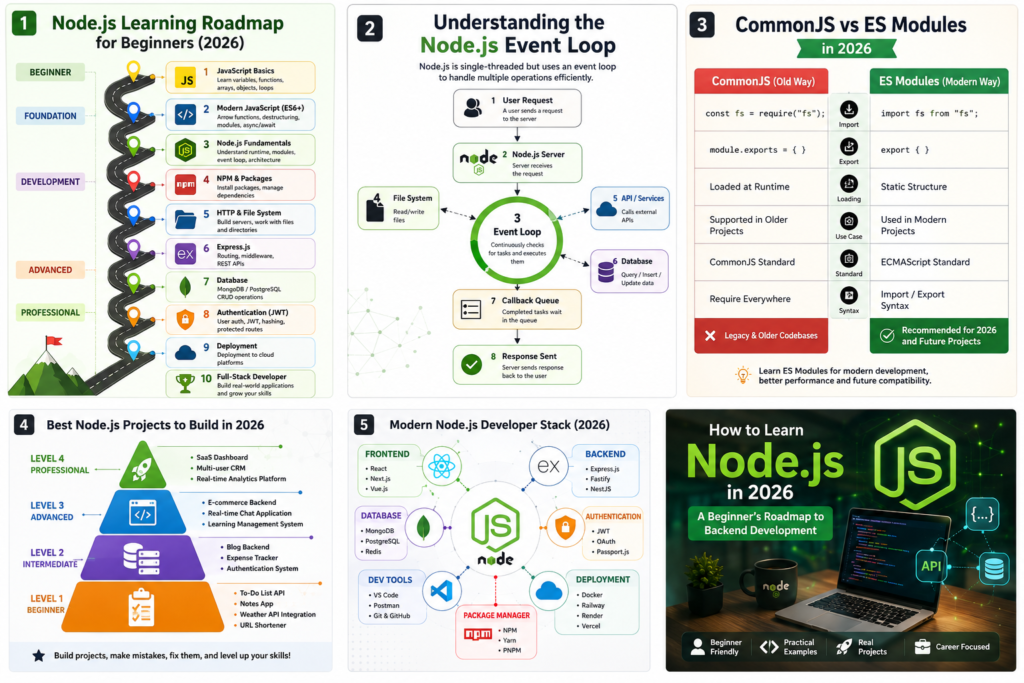
What Is Node.js Used for in 2026?
Node.js has matured significantly over the past decade. Today, it powers everything from small startup products to large-scale enterprise applications.
Building APIs
Most modern applications rely on APIs to exchange data.
Examples include:
- Mobile application backends
- E-commerce platforms
- Customer portals
- SaaS products
- Internal business tools
Real-Time Applications
Node.js excels at handling real-time communication because of its event-driven architecture.
Common examples include:
- Chat applications
- Live dashboards
- Collaboration tools
- Online gaming platforms
- Notification systems
Automation and Productivity Tools
Many developers use Node.js for everyday automation tasks such as:
- Processing spreadsheets
- Generating reports
- Data scraping
- File conversions
- Scheduled workflows
Full-Stack Development
Combined with React, Next.js, Vue, or other frontend frameworks, Node.js enables developers to work across the entire application stack.
This versatility is one reason companies continue hiring Node.js developers at every experience level.
Is Node.js Good for Beginners?
In most cases, yes.
If your goal is web development, Node.js offers one of the shortest learning paths because you don’t need to switch languages between frontend and backend work.
Why Beginners Like Node.js
- Large and active community
- Extensive learning resources
- Massive package ecosystem
- Strong job market demand
- Easy setup process
- Fast development cycle
What Beginners Often Find Difficult
Most challenges come from concepts rather than syntax:
- Asynchronous programming
- Promises
- Async/await
- Event-driven architecture
- Managing project structure
The good news is that these concepts become much easier once you build a few small projects.
How to Install Node.js and NPM
The first step is installing Node.js on your computer.
Visit the official Node.js website and download the latest LTS (Long-Term Support) version.
After installation, open a terminal and verify that Node.js is available:
node -v
Check NPM as well:
npm -v
If both commands return version numbers, you’re ready to start building.
What Is NPM?
NPM (Node Package Manager) comes bundled with Node.js.
Think of it as a library marketplace for JavaScript developers.
Need a web framework?
npm install express
Need database tools?
npm install mongoose
Need authentication libraries?
Install them with a single command.
This ecosystem is one of Node.js’s biggest strengths.
Core Concepts Every Beginner Should Learn
Before jumping into frameworks, spend time understanding how Node.js works.
A strong foundation saves countless hours of frustration later.
Understand Modern JavaScript First
Many developers struggle with Node.js because they skip JavaScript fundamentals.
Focus on:
- Variables and scope
- Functions
- Objects and arrays
- Arrow functions
- Destructuring
- Modules
- Promises
- Async/await
If these concepts feel comfortable, Node.js becomes much easier to learn.
Understanding Asynchronous JavaScript
One of the defining features of Node.js is its non-blocking behavior.
Imagine ordering food at a restaurant.
You place your order and continue talking with friends while the kitchen prepares your meal.
You don’t stand at the counter waiting.
Node.js works in a similar way.
Instead of waiting for one operation to finish, it continues handling other tasks.
Example:
console.log("Start");

setTimeout(() => {
  console.log("Finished");
}, 2000);

console.log("End");
Output:
Start
End
Finished
This behavior allows Node.js applications to remain responsive even when handling thousands of requests.
The Node.js Event Loop Explained
The event loop is often described as the heart of Node.js.
In simple terms, it continuously checks whether pending operations have completed and determines what code should run next.
As a beginner, you don’t need to memorize every technical detail.
Just remember this:
The event loop helps Node.js manage many operations efficiently without creating a separate thread for every user request.
Understanding this concept will make asynchronous programming much less intimidating.
ES Modules vs CommonJS in 2026
You’ll encounter two different module systems when learning Node.js.
CommonJS (Older Style)
const fs = require("fs");
ES Modules (Modern Standard)
import fs from "fs";
Which One Should Beginners Learn?
Prioritize ES Modules.
Most new projects now use import and export syntax because it aligns with modern JavaScript standards and frontend frameworks.
However, don’t be surprised when older tutorials or legacy projects still use CommonJS.
Being familiar with both systems is useful, but ES Modules should be your primary focus.
Essential Built-In Node.js Modules
One advantage of Node.js is that many useful tools are included by default.
HTTP Module
The HTTP module allows you to create web servers without installing anything extra.
import http from "http";

const server = http.createServer((req, res) => {
  res.end("Hello World");
});

server.listen(3000);
This simple example creates a web server that responds with a message whenever someone visits it.
File System (fs) Module
The File System module is used for working with files and folders.
import fs from "fs";

fs.writeFileSync("welcome.txt", "Welcome to Node.js");
In real applications, you’ll use this module to:
- Read files
- Save uploads
- Generate reports
- Process documents
- Manage application data
Build Your First Web Server
Creating a server is often the moment when Node.js starts to feel real.
import http from "http";

const server = http.createServer((req, res) => {
  res.writeHead(200, {
    "Content-Type": "text/plain"
  });

  res.end("Server Running");
});

server.listen(3000);
Run the file and visit:
http://localhost:3000
Seeing your first server respond in the browser is a small milestone, but it’s an important one.
Many professional backend developers started with a nearly identical project.
Building a REST API with Express.js
While Node.js can create servers on its own, most production applications use Express.js.
Install Express:
npm install express
Create a simple API:
import express from "express";

const app = express();

app.get("/", (req, res) => {
  res.json({
    message: "Hello API"
  });
});

app.listen(3000);
Express removes much of the repetitive work involved in backend development and lets you focus on building features.
For beginners, it’s the natural next step after learning Node.js fundamentals.
A Practical Node.js Roadmap for Beginners
Trying to learn everything at once is one of the fastest ways to burn out.
Instead, follow a structured path.
Stage 1: Master JavaScript
Focus on:
- Functions
- Arrays
- Objects
- ES6 syntax
- Async programming
Stage 2: Learn Core Node.js
Study:
- Modules
- NPM
- Event loop
- File system
- HTTP server creation
Stage 3: Learn Express.js
Practice:
- Routing
- Middleware
- APIs
- Error handling
Stage 4: Learn Databases
Good beginner options include:
- MongoDB
- PostgreSQL
Learn how to:
- Store data
- Retrieve data
- Update records
- Delete records
Stage 5: Authentication
Explore:
- JWT
- Password hashing
- User sessions
- Authorization
Stage 6: Deployment
Deploy real applications and learn how software reaches actual users.
This step is where many developers gain confidence and start building portfolio projects.
Practical Projects That Teach More Than Tutorials
Watching tutorials is useful.
Building projects is where learning becomes permanent.
Beginner Projects
- To-do API
- Notes application backend
- Weather API integration
- URL shortener
Intermediate Projects
- Authentication system
- Expense tracker
- Blog backend
- Task management API
Advanced Projects
- E-commerce backend
- Real-time chat application
- Learning management system
- SaaS dashboard backend
A developer who completes five meaningful projects usually learns more than someone who watches dozens of tutorial videos without building anything.
Common Mistakes New Developers Make
Watching Without Building
Tutorials create familiarity.
Projects create skill.
Try to build something after every major concept you learn.
Ignoring JavaScript Fundamentals
Node.js is JavaScript.
Weak JavaScript knowledge becomes a bottleneck very quickly.
Learning Too Many Technologies Simultaneously
A common beginner mistake is trying to learn:
- React
- Node.js
- Docker
- AWS
- Kubernetes
All within a few weeks.
Focus on one layer at a time.
Depth matters more than breadth in the early stages.
Avoiding Documentation
Documentation may seem intimidating initially, but it often provides the most accurate and up-to-date information.
Developers who learn to read documentation become independent much faster.
Frequently Asked Questions
How long does it take to learn Node.js from scratch?
Most beginners can understand the fundamentals within one to two months of consistent practice.
Becoming job-ready typically requires several months of project-based learning.
Is Node.js still relevant in 2026?
Yes. Node.js continues to be widely used for APIs, backend systems, real-time applications, and full-stack development.
Can I learn Node.js without knowing JavaScript?
You can, but it will be significantly harder.
A solid understanding of JavaScript fundamentals makes the learning process much smoother.
Do I need Express.js?
Not necessarily.
You can build servers using only Node.js, but Express.js simplifies development and is commonly used in professional projects.
Which database should beginners learn?
MongoDB and PostgreSQL are both excellent choices.
Choose one, build projects with it, and focus on understanding database fundamentals before exploring others.
Final Thoughts
Learning Node.js in 2026 isn’t about memorizing every API or framework. It’s about understanding how backend applications work and gaining experience through hands-on projects.
Start small. Build simple applications. Make mistakes. Debug them. Improve them.
Every experienced backend developer has spent hours staring at error messages, fixing broken code, and rebuilding projects from scratch. That’s not a sign you’re doing something wrong—it’s part of the learning process.
If you consistently practice JavaScript, learn the fundamentals of Node.js, and build real projects, you’ll develop skills that remain valuable across countless areas of modern software development.
The most effective Node.js learning strategy is still the simplest:
Learn the basics, build something useful, and keep shipping projects.
Readd about Supabase – knowabteverything
How to Import Product Data into Supabase Using a CSV File (Without Writing SQL) – knowabteverything
How to Fix Supabase AuthApiError: “Database Error Finding User” During Signup – knowabteverything
official website for node.js Index | Node.js v26.5.0 Documentation

About Amish
Hi, I’m Amish, and developer.
I write practical React Native, Node.js, MongoDB, and Supabase tutorials based on real projects and testing.
[…] Read about How to Learn Node.js in 2026: A Practical Roadmap for Complete Beginners – knowabteverything […]