
How to Build a Functional Shopping Cart System in React Native Expo (Step-by-Step Guide). A shopping cart is one of those features that looks easy until you start building it.
Most developers can create an “Add to Cart” button in a few minutes. The real challenge appears later when users expect quantities to update instantly, cart data to survive app restarts, prices to calculate correctly, and everything to stay synchronized across screens.
I’ve worked on Expo-based eCommerce projects where the cart began as a simple array stored in state. It worked perfectly during development. Then the product catalog grew, users started adding dozens of items, and performance issues began to appear. Suddenly, every cart update caused unnecessary re-renders, totals became inconsistent, and users occasionally lost their carts after reopening the app.
That’s why investing time in a proper cart architecture from the beginning pays off.
In this guide, you’ll learn how to build a production-ready shopping cart system in React Native Expo using modern tools such as Zustand, Expo Router, MMKV, and SQLite. We’ll also look at common mistakes, performance considerations, and practical implementation strategies used in real-world applications.
Table of Contents
- Why Shopping Cart Architecture Matters
- Choosing the Right State Management Approach
- Project Setup
- Building a Cart Store with Zustand
- Adding Products and Managing Quantities
- Creating a Dynamic Cart Badge with Expo Router
- Persisting Cart Data Using MMKV
- Calculating Totals Without Decimal Errors
- Swipe-to-Delete Cart Items
- Syncing Cart Data with a Backend API
- Using SQLite for Offline Shopping Apps
- Redux Toolkit vs Zustand
- Common Shopping Cart Mistakes
- Production Tips
- FAQ
- Final Thoughts
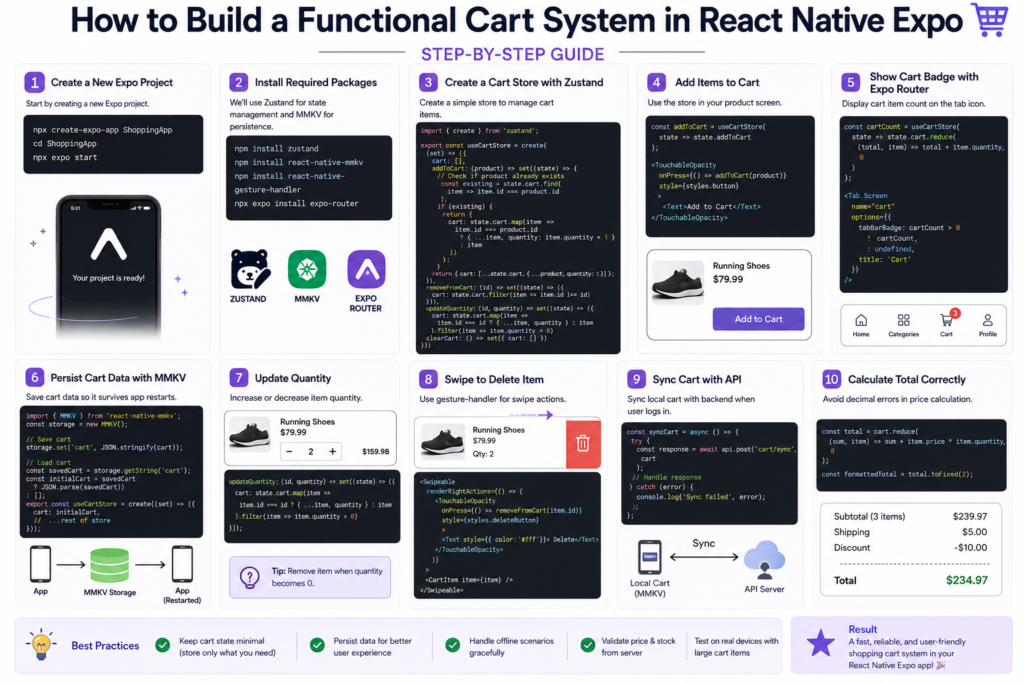
Why Shopping Cart Architecture Matters
Think about how users interact with an eCommerce app.
They browse products, compare options, add items, leave the app, return later, and eventually complete a purchase. Throughout that journey, the cart acts as temporary storage for their buying decisions.
When the cart behaves unexpectedly, trust disappears quickly.
Common issues include:
- Cart items disappearing after reopening the app
- Incorrect quantity updates
- Slow interface responses
- Duplicate products
- Incorrect price calculations
- Failed synchronization between devices
A well-designed cart system solves these problems before they affect users.
Choosing the Right State Management Approach
One of the first decisions you’ll make is where cart data should live.
Many React Native developers initially use React Context because it’s built into React and requires no additional dependencies.
For small projects, that approach works.
As applications grow, however, Context can become difficult to manage. Cart updates may trigger re-renders throughout large sections of the application, especially when product lists become extensive.
This is why developers frequently encounter discussions around:
react native context api cart performance issues
For most Expo applications, three options are worth considering:
| Solution | Best Use Case |
|---|---|
| Context API | Small projects |
| Zustand | Medium-sized apps |
| Redux Toolkit | Large enterprise applications |
If you’re building a modern shopping app today, Zustand is often the sweet spot between simplicity and performance.
Setting Up Your Expo Project
Create a new Expo project:
npx create-expo-app ShoppingApp
Install the required packages:
npm install zustand
npm install react-native-mmkv
npm install react-native-gesture-handler
If you’re using Expo Router:
npx expo install expo-router
Keeping dependencies minimal makes maintenance easier later.
Building a Cart Store with Zustand
One reason many developers search for react native expo cart with zustand is that Zustand removes much of the boilerplate associated with traditional state management libraries.
Create a simple store:
import { create } from 'zustand';

const useCartStore = create((set) => ({
  cart: [],

  addToCart: (product) =>
    set((state) => ({
      cart: [...state.cart, product],
    })),

  removeFromCart: (id) =>
    set((state) => ({
      cart: state.cart.filter(
        item => item.id !== id
      ),
    })),
}));
This basic implementation works, but real applications typically require additional functionality:
- Quantity management
- Duplicate product prevention
- Persistence
- Price calculations
- API synchronization
A production-ready cart usually evolves over time, so keeping the store structure clean from the beginning is important.
Managing Product Quantities Correctly
One mistake I frequently see is allowing duplicate cart entries.
Instead of adding the same product multiple times, most shopping apps increase the quantity.
For example:
Incorrect Behavior
Running Shoes
Running Shoes
Running Shoes
Better Behavior
Running Shoes x 3
This reduces complexity and creates a cleaner user experience.
A good cart system should:
- Increase quantity automatically
- Decrease quantity safely
- Remove products when quantity reaches zero
- Prevent negative values
These small details significantly improve usability.
Creating a Dynamic Cart Badge with Expo Router
Users should always know how many items are currently in their cart.
This is where a dynamic badge becomes useful.
Many developers implementing react native dynamic cart badge expo router use a simple pattern:
const cartCount = useCartStore(
  state => state.cart.length
);
Then display the count in your tab navigator.
The result is immediate visual feedback whenever products are added or removed.
It’s a small feature, but it makes the application feel more polished.
Persisting Cart Data Using MMKV
Imagine a user spending twenty minutes adding products to their cart.
They receive a phone call, close the app, and reopen it later.
If the cart is empty, there’s a good chance you’ve lost that customer.
This is why persistence matters.
Many developers choose to persist react native cart data using MMKV because it is significantly faster than AsyncStorage and performs exceptionally well on mobile devices.
Store the cart whenever changes occur and restore it during application startup.
From a user perspective, the experience feels seamless.
From a business perspective, it helps reduce abandoned purchases.
Calculating Cart Totals Without Pricing Errors
Price calculations often appear straightforward until floating-point precision becomes involved.
Consider this JavaScript example:
0.1 + 0.2
Instead of returning:
0.3
JavaScript returns:
0.30000000000000004
That tiny issue can create noticeable errors in shopping applications.
Always format currency values before displaying them:
const total =
  cart.reduce(
    (sum, item) =>
      sum + item.price * item.quantity,
    0
  );

const formattedTotal =
  total.toFixed(2);
Developers searching for react native shopping cart total calculation decimal fix often discover this issue after customers begin reporting strange totals.
It’s much easier to prevent than repair later.
Adding Swipe-to-Delete Functionality
Modern mobile users expect intuitive gestures.
One feature that consistently improves usability is swipe-to-delete.
Implementing swipe to delete cart item react native expo allows users to remove products without navigating through additional menus.
Benefits include:
- Faster interactions
- Cleaner interface
- Familiar mobile experience
- Fewer taps
When combined with smooth animations, the cart feels considerably more responsive.
Syncing Cart Data with Backend APIs
Many shopping apps support guest users.
A common scenario looks like this:
- User adds products while not logged in
- Cart data is stored locally
- User creates an account
- Local cart merges with server data
This is where developers often need to sync AsyncStorage cart data with API React Native or synchronize MMKV-based storage with backend services.
A reliable synchronization strategy prevents:
- Lost items
- Duplicate products
- Device inconsistencies
Always decide which source of truth wins when conflicts occur.
Using SQLite for Offline Shopping Applications
For small and medium-sized carts, MMKV is usually sufficient.
Larger applications may benefit from SQLite.
Developers exploring an Expo SQLite shopping cart tutorial are often building apps that:
- Support offline browsing
- Handle large product catalogs
- Store extensive order information
- Need structured local databases
SQLite becomes especially useful when the cart is only one part of a broader offline-first architecture.
Redux Toolkit vs Zustand
This question appears in almost every React Native project eventually.
Should you use Redux Toolkit or Zustand?
My recommendation is straightforward:
Choose Zustand when:
- Building quickly
- Working alone or in a small team
- Managing moderate complexity
Choose Redux Toolkit when:
- Multiple developers share ownership
- Advanced middleware is needed
- State management becomes highly complex
For most Expo-based shopping apps, Zustand is usually enough.
Common Shopping Cart Mistakes
Using Context for Everything
Context is useful, but large carts can generate unnecessary re-renders.
Storing Entire Product Objects
Store only the information required for checkout.
Avoid saving large amounts of unused product data.
Ignoring Offline Users
Mobile users frequently switch networks.
Design your cart to survive temporary connection issues.
Forgetting Data Persistence
Users expect their cart to remain available after restarting the app.
Recalculating Totals Excessively
Memoization can prevent unnecessary calculations and improve performance.
Production Tips from Real Projects
Before launching a shopping app, I typically verify the following:
- Cart survives application restarts
- Quantities update correctly
- Duplicate products are handled properly
- Prices remain accurate
- Guest users can transition to authenticated accounts
- Offline scenarios are tested
- Cart synchronization works reliably
Testing these situations early can prevent many support issues after launch.
Frequently Asked Questions
What is the best state management solution for a React Native Expo cart?
For most projects, Zustand provides an excellent balance between simplicity, performance, and maintainability.
Is React Context suitable for shopping carts?
Yes, for small applications. Larger projects often benefit from Zustand or Redux Toolkit.
Should I use MMKV or AsyncStorage?
MMKV generally offers better performance and is a strong choice for cart persistence.
When should I choose SQLite?
SQLite is useful when building offline-first applications or managing larger datasets.
Does every shopping app need Redux?
No. Many successful Expo applications operate perfectly with Zustand.
Final Thoughts
A shopping cart isn’t just another feature—it’s where browsing turns into purchasing.
The best cart systems are fast, reliable, and invisible. Users shouldn’t have to think about whether their products are saved, whether quantities updated correctly, or whether prices are accurate. Everything should simply work.
For most React Native Expo projects, a combination of Zustand, Expo Router, MMKV persistence, and thoughtful cart design provides an excellent foundation. Start simple, focus on reliability, and optimize only when your application’s requirements demand it.
The goal isn’t to build the most complicated cart possible. It’s to build one your users never have to worry about.
Top 50 React Native Interview Questions & Answers (2026 Edition Part 1) – knowabteverything
How to Build a Functional E-Commerce App Using React Native and AI Prompts
The 3-Line Flexbox Trick That Centers Anything in React Native – knowabteverything
React Native · Learn once, write anywhere

About Amish
Hi, I’m Amish, and developer.
I write practical React Native, Node.js, MongoDB, and Supabase tutorials based on real projects and testing.
[…] Read about How to Build a Functional Shopping Cart System in React Native Expo (Step-by-Step Guide) – kno… […]