
Why is my flatlist not updating when state changes A while back, I was building a simple React Native app that displayed a list of tasks. Nothing fancy—just a FlatList showing data stored in state.
I added a button to create a new task. The API call worked. The state updated. The console showed the new item exactly where it should be.
But the FlatList never changed.
At first, I blamed React Native.
Then I blamed the API.
Then I spent nearly an hour debugging before realizing the problem was in my state update logic.
If that sounds familiar, you’re not alone.
“FlatList not updating after state change” is one of the most common React Native issues developers encounter. The good news is that FlatList is rarely broken. Most of the time, React Native is doing exactly what it’s supposed to do.
Let’s look at why this happens and how to fix it without wasting hours chasing the wrong problem.
Table of Contents
- Why FlatList Doesn’t Always Re-render
- The Most Common Cause: Mutating State
- Why React Cares About References
- When You Need the
extraDataProp - The Hidden Problem With List Keys
- A Real Debugging Example
- Common Mistakes Developers Make
- How I Debug FlatList Issues
- Performance Tips After the Fix
- FAQ
- Final Thoughts
Why FlatList Doesn’t Always Re-render
One misconception I see frequently is that FlatList constantly watches every item inside your array.
It doesn’t.
If it did, performance would become a nightmare for large datasets.
Instead, FlatList relies on React’s rendering system. React usually checks whether the data reference has changed. If it hasn’t, React may assume nothing important happened.
That’s why you can sometimes see updated data in the console while the UI continues showing old information.
It feels confusing until you understand how React handles state updates.
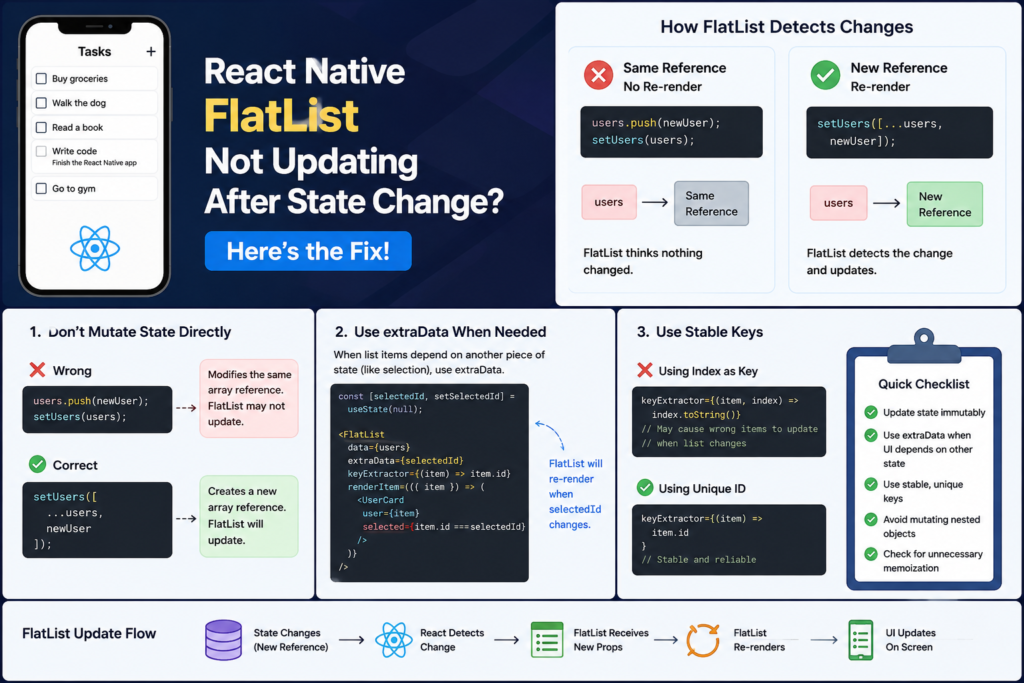
The Most Common Cause: Mutating State Directly
If I had to guess the cause without seeing your code, this would be my first suspect.
Consider this example:
const [users, setUsers] = useState([]);

const addUser = () => {
  users.push({
    id: "1",
    name: "John"
  });

  setUsers(users);
};
Most developers have written code like this at some point.
The issue is subtle.
The push() method changes the original array instead of creating a new one.
So although the array now contains more data, React still sees the same array reference.
As a result, FlatList may not refresh.
The Better Approach
Instead of modifying the existing array, create a new one:
const addUser = () => {
  setUsers([
    ...users,
    {
      id: "1",
      name: "John"
    }
  ]);
};
Now React receives a completely new array.
Because the reference changed, FlatList knows it needs to update.
This single fix solves a surprising number of FlatList problems.
Why React Cares About References
This is the part that confused me when I first started working with React.
Let’s imagine you have two boxes.
The first box contains three apples.
Instead of replacing the box, you simply add another apple inside it.
The contents changed, but the box itself is still the same box.
That’s essentially what happens when you use methods like:
push()
splice()
sort()
reverse()
React often checks whether the “box” changed, not whether the contents inside it changed.
When you create a new array using the spread operator (...), you’re giving React a brand-new box.
That’s why the UI updates correctly.
When You Need the extraData Prop
Sometimes your data array isn’t the problem at all.
I ran into this while building a product catalog app.
The list data remained unchanged, but users could select items. The selected item should display a different background color.
My state looked something like this:
const [selectedId, setSelectedId] = useState(null);
The FlatList used the same array of products throughout the session.
The problem?
FlatList didn’t know that the UI depended on selectedId.
The Solution
Use the extraData prop.
<FlatList
  data={products}
  extraData={selectedId}
  renderItem={renderItem}
/>
This tells FlatList:
“Whenever selectedId changes, please re-render.”
If your list items depend on anything outside the data prop, extraData is often the missing piece.
The Hidden Problem With List Keys
Another issue that’s easy to overlook involves keys.
I’ve reviewed codebases where everything looked correct except for one thing:
keyExtractor={(item, index) =>
  index.toString()
}
Using array indexes as keys can work temporarily.
Then one day you:
- Insert an item
- Delete an item
- Sort the list
- Refresh data from an API
Suddenly strange rendering behavior appears.
Wrong items update.
Animations break.
UI elements seem out of sync.
A Better Option
Use a unique identifier whenever possible:
keyExtractor={(item) => item.id}
Stable keys help React accurately track what changed.
Think of keys as name tags.
If every employee in an office wore the same name tag, confusion would be inevitable.
The same applies to list rendering.
A Real Debugging Example
One of the most frustrating FlatList issues I encountered involved updating a user’s profile information.
The API response was correct.
The state was correct.
The logs were correct.
Yet the UI still showed old data.
The problem turned out to be this:
users[0].name = "Mike";
setUsers(users);
At first glance, nothing seems wrong.
But I was modifying an object inside the existing array.
React still saw the same array reference.
The fix was:
const updatedUsers = [...users];

updatedUsers[0] = {
  ...updatedUsers[0],
  name: "Mike"
};

setUsers(updatedUsers);
The moment I changed the reference, FlatList refreshed immediately.
That experience taught me an important lesson:
When debugging FlatList, don’t just check whether data changed.
Check whether references changed.
Common Mistakes Developers Make
Over the years, I’ve noticed the same mistakes appearing repeatedly.
Using push() on State Arrays
This is probably the biggest one.
Avoid mutating state directly.
Using Array Indexes as Keys
It works until the list changes.
Then strange bugs appear.
Forgetting About extraData
If rendering depends on external state, FlatList needs to know.
Blaming FlatList Too Quickly
In most cases, FlatList is innocent.
The actual issue is somewhere in state management.
Overusing React.memo
I’ve seen developers spend hours debugging only to discover that a memoized component was preventing re-renders.
Optimization is useful, but only after the app works correctly.
How I Debug FlatList Issues
Whenever a FlatList refuses to update, I follow the same checklist.
Step 1: Verify State
console.log(data);
Confirm the new data actually exists.
Step 2: Check State Updates
Look for:
push()
splice()
sort()
reverse()
These often indicate mutations.
Step 3: Verify Keys
Ensure every item has a stable unique ID.
Step 4: Check extraData
Ask yourself:
“Does the UI depend on another state variable?”
If yes, try extraData.
Step 5: Review Memoized Components
Temporarily remove:
React.memo()
and test again.
This simple process usually identifies the problem within minutes.
Performance Tips After the Fix
Once everything works, it’s worth thinking about performance.
Keep Keys Stable
Always prefer unique IDs.
Avoid Unnecessary Re-renders
Only use extraData when needed.
Keep Render Functions Clean
Complex rendering logic inside renderItem can slow large lists.
Optimize Last
One of the best lessons I’ve learned in React Native development is this:
Make it work first.
Then make it fast.
Trying to optimize too early often introduces bugs that are harder to diagnose than the original problem.
Frequently Asked Questions
Why does FlatList not update even though state changes?
Usually because the state reference remains the same. React detects new references more reliably than internal mutations.
What does extraData do?
It tells FlatList to re-render when another value changes, even if the data prop stays the same.
Should I use array indexes as keys?
In most cases, no. Stable IDs provide more predictable rendering behavior.
Can React.memo stop FlatList updates?
Yes. If React believes props haven’t changed, memoized components may skip rendering.
How do I force FlatList to refresh?
The preferred solution is fixing the underlying state update. In some cases, adding extraData can trigger the re-render you need.
Final Thoughts
Whenever I hear someone say, “FlatList isn’t updating,” I immediately look at how state is being updated.
More often than not, the issue isn’t the FlatList.
It’s a mutated array, an unchanged object reference, a missing extraData prop, or unstable keys.
The fastest way to avoid these problems is to develop one habit:
Always treat React state as immutable.
Create new arrays instead of modifying old ones. Create new objects instead of changing existing ones.
Once that becomes second nature, FlatList rendering issues become far less mysterious—and much easier to fix when they do appear.
Read about The Ultimate React Native Beginner Roadmap (2026 Edition) – knowabteverything
The 3-Line Flexbox Trick That Centers Anything in React Native – knowabteverything
How to Fix Expo Status Bar Overlapping iPhone Notches and Dynamic Island Devices – knowabteverything
React Native · Learn once, write anywhere

About Amish
Hi, I’m Amish, and developer.
I write practical React Native, Node.js, MongoDB, and Supabase tutorials based on real projects and testing.
[…] Why Is My FlatList Not Updating When State Changes? 4 Fast Solutions – knowabteverything […]
[…] Why Is My FlatList Not Updating When State Changes? 4 Fast Solutions – knowabteverything […]