
The Ultimate React Native Beginner Roadmap (2026 Edition) Learn React Native from scratch, build real-world mobile apps, and avoid the mistakes that slow down most beginners.
Introduction
Every year, thousands of developers decide to learn mobile app development. Many start by looking at Android development, iOS development, Flutter, or React Native and immediately feel overwhelmed by the number of tutorials, frameworks, and opinions online.
The good news is that React Native remains one of the most practical ways to build mobile apps in 2026.
Instead of maintaining separate Android and iPhone codebases, React Native allows you to build applications for both platforms using JavaScript and React. This saves time, reduces development costs, and makes it easier for solo developers and small teams to launch products.
I’ve noticed that most beginners don’t struggle because React Native is difficult. They struggle because they try to learn everything at once.
They jump into advanced libraries, state management frameworks, animations, and deployment tools before understanding the fundamentals.
This roadmap follows the approach that works best in real projects: learn the essentials first, build small applications, then gradually add more advanced skills as your confidence grows.
Whether you’re a student, a web developer expanding your skills, or someone looking to build your first startup app, this guide will show you what to learn, when to learn it, and what can safely wait until later.
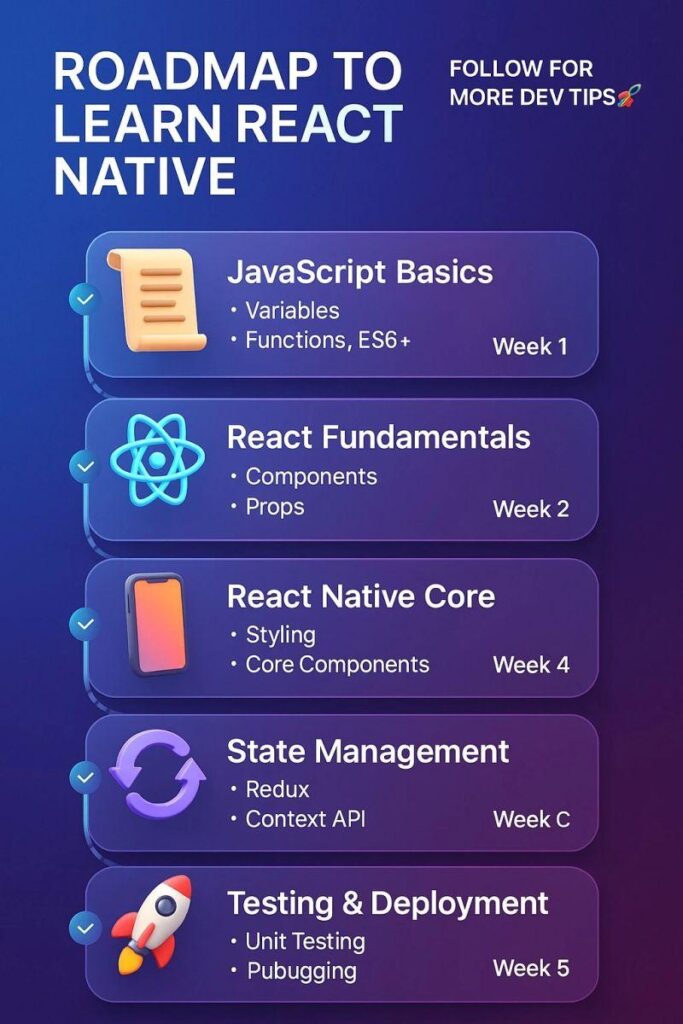
Table of Contents
- Why React Native Is Still Worth Learning in 2026
- Prerequisites to Learn React Native
- Learn JavaScript Before Anything Else
- Learn React Fundamentals
- React Native CLI vs Expo for Beginners in 2026
- Your React Native Mobile Development Roadmap
- React 19 for React Native Developers
- React Native Navigation Tutorial 2026
- State Management Without the Confusion
- Working With APIs and Backends
- React Native New Architecture Explained
- Expo EAS Build Guide for Beginners
- Best React Native Projects for Beginners
- Common Mistakes That Slow Down Learning
- How Long Does It Take to Learn React Native?
- Frequently Asked Questions
- Final Takeaway
Why React Native Is Still Worth Learning in 2026
Despite the arrival of new frameworks and development tools, React Native continues to be one of the most widely used cross-platform mobile development solutions.
Many startups choose React Native because they can launch on Android and iOS faster without hiring separate teams. Established companies continue using it because of its mature ecosystem and large developer community.
Key Benefits
- One codebase for Android and iOS
- Massive community support
- Strong job market demand
- Faster development cycles
- Large library ecosystem
- Easy integration with backend services
For beginners, one of the biggest advantages is that React Native builds on JavaScript and React, skills that are useful far beyond mobile development.
Even if you later move into web development, full-stack engineering, or product development, the time spent learning React Native continues to pay off.
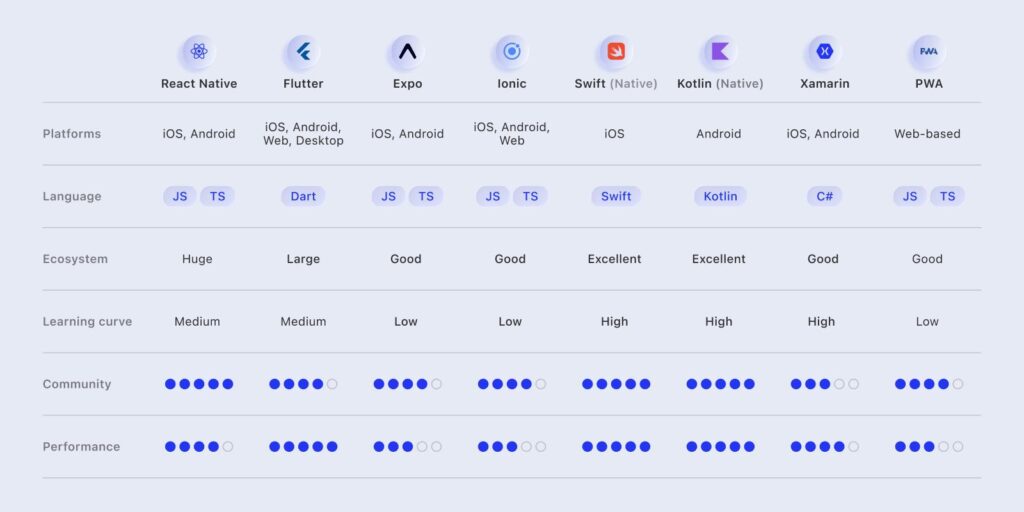
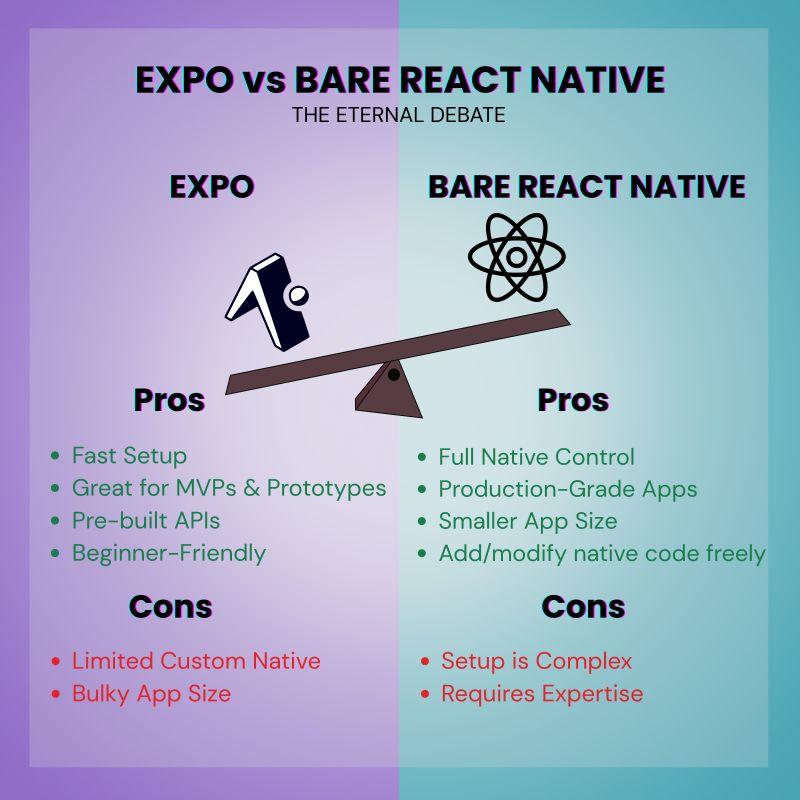
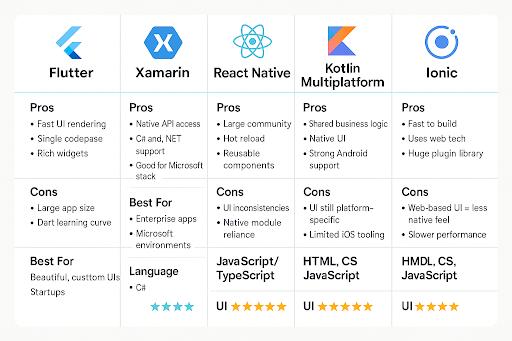
Comparison chart React Native CLI vs Expo
Prerequisites to Learn React Native
One of the most common misconceptions is that you need advanced programming knowledge before learning React Native.
You don’t.
However, a few fundamentals make the learning process much smoother.
Skills You Should Understand First
- Variables and data types
- Functions
- Loops
- Conditions
- Arrays and objects
- Basic programming logic
Think of React Native as driving a car.
Before learning how to drive on a highway, you need to understand how the steering wheel, brakes, and accelerator work.
JavaScript provides those fundamentals.
Step 1: Learn JavaScript Before Anything Else
If someone asks me how to learn React Native from scratch, my first recommendation is always the same:
Spend time learning JavaScript properly.
Many beginners rush through JavaScript tutorials because they’re excited to build apps. A few weeks later, they struggle with state updates, asynchronous code, or API requests because the foundation isn’t strong enough.
Topics Worth Mastering
Focus on:
- ES6 syntax
- Arrow functions
- Objects and arrays
- Destructuring
- Template literals
- Modules
- Promises
- Async/Await
- Error handling
Practice Before Moving Forward
Build small projects such as:
- Calculator
- To-do list
- Expense tracker
- Quiz application
These projects might seem simple, but they teach problem-solving skills you’ll use every day as a mobile developer.
Step 2: Learn React Fundamentals
React Native becomes much easier when you already understand React.
In fact, most of your day-to-day React Native work involves concepts that come directly from React itself.
Core Concepts to Learn
- Components
- Props
- State
- Hooks
- Forms
- Event handling
- Conditional rendering
- Context API
A Real-World Example
Imagine you’re building a food delivery application.
The restaurant card, order summary, and user profile section are all examples of reusable React components.
Once you understand component-based thinking, building larger applications becomes much more manageable.
React Native CLI vs Expo for Beginners in 2026
This question appears in almost every React Native community.
Should You Start With Expo?
For most beginners, the answer is yes.
Expo removes much of the setup complexity that previously discouraged newcomers.
Instead of spending hours configuring Android and iOS environments, you can focus on learning how to build applications.
Why Beginners Prefer Expo
- Faster setup
- Easier debugging
- Better documentation
- Built-in development tools
- Simplified deployment
When React Native CLI Makes Sense
React Native CLI becomes valuable when:
- You need advanced native integrations
- You’re working on enterprise applications
- Your project requires deep platform customization
For your first few applications, Expo is usually the fastest path from idea to working app.
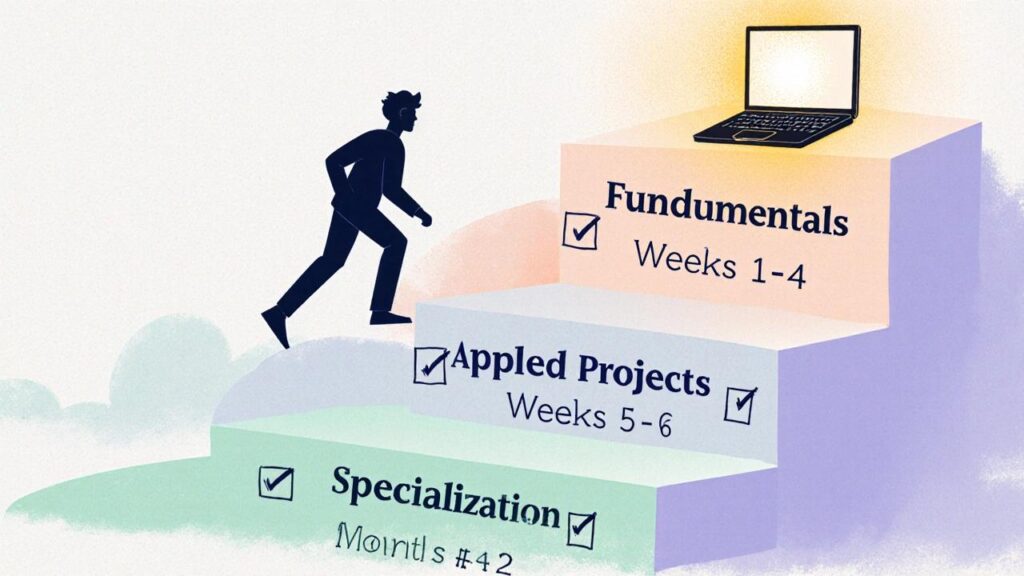
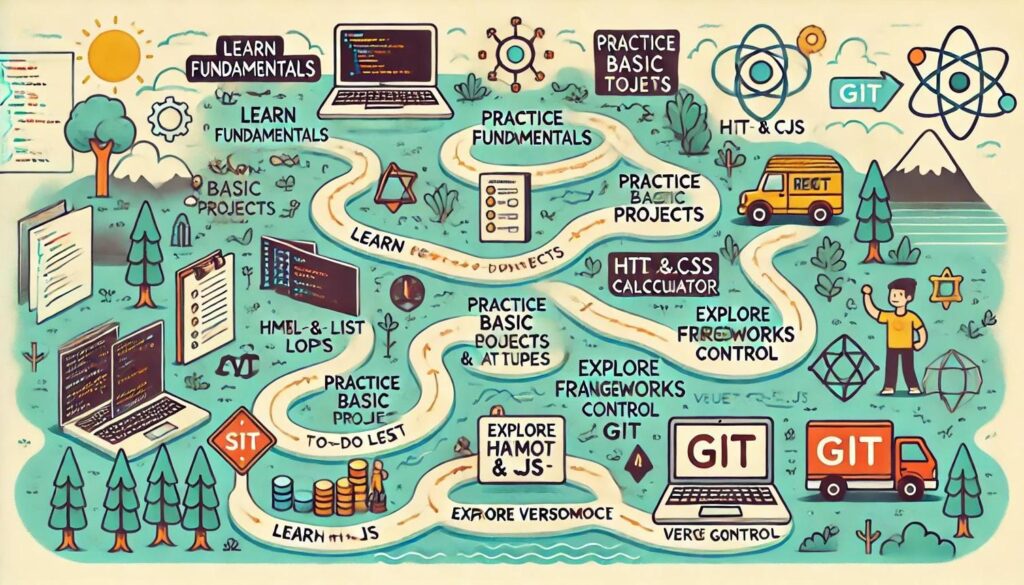
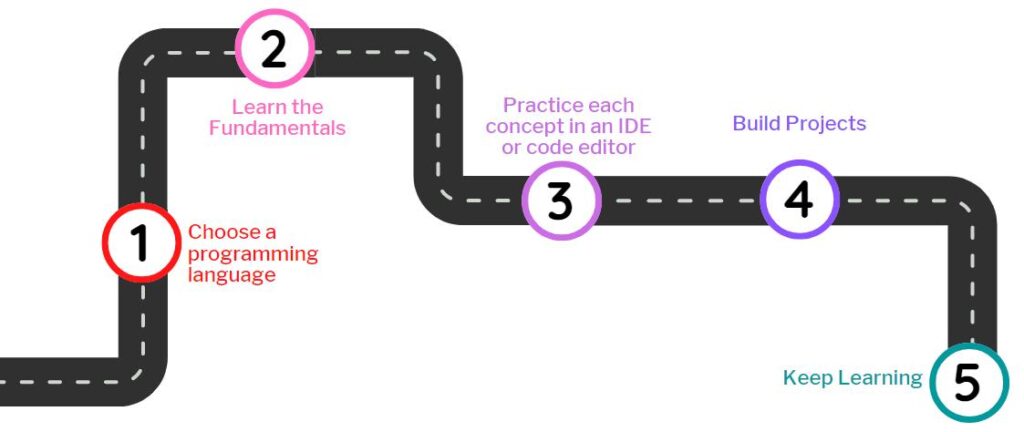
Your React Native Mobile Development Roadmap
The most effective learning path is progressive.
Each stage builds on the previous one.
Stage 1: User Interface Development
Learn:
- Text components
- Buttons
- Images
- Flexbox
- Styling
- Responsive layouts
Your goal here is simple:
Build screens that look good on different devices.
Stage 2: Navigation
Almost every app contains multiple screens.
Examples include:
- Login page
- Dashboard
- Profile page
- Settings screen
Learning navigation teaches users how to move through your application naturally.
Stage 3: Data and APIs
Real applications need real data.
Learn how to:
- Fetch data from APIs
- Display remote content
- Handle loading states
- Manage errors gracefully
A weather app is often a perfect beginner project because it combines API integration with user-friendly UI design.
Stage 4: State Management
As applications grow, managing data becomes more challenging.
Start with:
- useState
- useReducer
- Context API
Only explore advanced solutions when your projects become large enough to require them.
Many beginners spend weeks learning Redux before they’ve built a single complete application.
That’s usually the wrong order.
Stage 5: Device Features
Modern mobile apps often use native device capabilities.
Examples include:
- Camera access
- GPS location
- Push notifications
- File uploads
- Local storage
These features make projects feel like real mobile applications rather than simple prototypes.
React 19 for React Native Developers
React 19 introduced several improvements that make development cleaner and more efficient.
As a beginner, you don’t need to memorize every new feature.
Instead, focus on:
- Functional components
- Modern hooks
- Component composition
- Performance fundamentals
A surprising number of professional applications are built using relatively simple React patterns.
Mastering the basics consistently delivers better results than chasing every new feature release.
React Native Navigation Tutorial 2026
Navigation is often the first major milestone in React Native learning.
The most widely adopted solution remains React Navigation.
Navigation Types You’ll Use
- Stack Navigation
- Bottom Tab Navigation
- Drawer Navigation
A simple social media application might use:
- Stack navigation for login flow
- Bottom tabs for main sections
- Nested navigation for profile pages
Understanding navigation early helps you structure applications properly from the beginning.
Working With APIs and Backends
Most modern mobile applications depend on backend services.
Think about the apps you use every day:
- Food delivery apps
- Ride-sharing apps
- Banking apps
- Social media platforms
All of them communicate with servers.
Essential Skills
Learn:
- REST APIs
- Authentication
- JSON data handling
- Error management
- Loading states
Beginner-Friendly Backend Platforms
For 2026, these services remain excellent choices:
- Firebase
- Supabase
- Appwrite
Many independent developers successfully launch production applications using these platforms without hiring dedicated backend engineers.
React Native New Architecture Explained
You’ll eventually hear developers discussing Fabric, TurboModules, and JSI.
These technologies form part of the React Native New Architecture.
What Does It Actually Mean?
In simple terms, the new architecture improves:
- Rendering performance
- App responsiveness
- Native communication speed
- Long-term scalability
Should Beginners Worry About It?
Not immediately.
It’s useful to understand why it exists, but your time is better spent building projects and strengthening your fundamentals.
Once you’ve completed several applications, these concepts become much easier to understand in context.
Expo EAS Build Guide for Beginners
Building an app is only half the journey.
Eventually, you’ll want real users to install it.
This is where Expo Application Services (EAS) comes in.
Typical Deployment Workflow
- Build your application
- Test thoroughly
- Configure app settings
- Generate production builds
- Submit to app stores
EAS dramatically simplifies a process that once required significant platform-specific knowledge.
For many beginners, it is the first time publishing an app feels achievable.
Best React Native Projects for Beginners
Projects accelerate learning faster than tutorials alone.
Beginner Projects
To-Do App
Learn:
- State management
- Lists
- User input
Weather App
Learn:
- APIs
- Async requests
- Error handling
Expense Tracker
Learn:
- Data persistence
- Charts
- Forms
Habit Tracker
Learn:
- Notifications
- Local storage
- User engagement
E-Commerce App
Learn:
- Authentication
- Product listings
- Shopping carts
Chat Application
Learn:
- Real-time data
- User accounts
- Backend integration
By the time you complete these projects, you’ll have practical experience with most of the concepts used in professional mobile applications.
Common Mistakes That Slow Down Learning
Tutorial Addiction
Watching ten tutorials does not equal building one application.
Create projects alongside your learning.
Skipping Fundamentals
Weak JavaScript skills create problems later.
Investing extra time in JavaScript almost always pays off.
Learning Too Many Libraries
Focus on one tool at a time.
Too many technologies create confusion instead of progress.
Fear of Debugging
Every developer spends time fixing bugs.
Debugging isn’t a sign you’re failing.
It’s a sign you’re building.
How Long Does It Take to Learn React Native?
The timeline varies depending on your background and learning consistency.
Typical Expectations
| Background | Estimated Time |
|---|---|
| Complete Beginner | 3–6 Months |
| JavaScript Developer | 1–3 Months |
| React Developer | 2–6 Weeks |
The biggest factor isn’t talent.
It’s consistency.
Even one focused hour per day can produce impressive progress over a few months.
Frequently Asked Questions
Is React Native worth learning in 2026?
Yes. It remains one of the strongest options for building cross-platform mobile applications efficiently.
Can I learn React Native without React?
You can, but learning React first makes the process significantly easier.
Should beginners choose Expo or React Native CLI?
Expo is generally the better starting point because it reduces setup complexity and speeds up development.
Do I need Android and iOS development experience?
No. Many developers successfully build and publish apps before learning native platform development.
Is React Native suitable for freelancing?
Absolutely. Many freelance projects involve creating cross-platform mobile applications, making React Native a valuable skill in today’s market.
Final Takeaway
The fastest way to learn React Native isn’t finding the perfect course or watching endless tutorials.
It’s building.
Start with JavaScript. Learn React fundamentals. Use Expo to create simple applications. Add navigation, API integration, state management, and deployment skills one step at a time.
Don’t worry about mastering every library or understanding every architectural detail immediately.
Professional developers grow through repetition, experimentation, mistakes, and completed projects.
Build your first app. Then build another.
Six months from now, you’ll be surprised by how far you’ve come.
Read about React Native – knowabteverything
The 3-Line Flexbox Trick That Centers Anything in React Native – knowabteverything
How to Fix Expo Status Bar Overlapping iPhone Notches and Dynamic Island Devices – knowabteverything
How to Generate Store-Ready iOS & Android App Icons (Without Figma or Photoshop) – knowabteverything
check official website of React Native React Native · Learn once, write anywhere

About Amish
Hi, I’m Amish, and developer.
I write practical React Native, Node.js, MongoDB, and Supabase tutorials based on real projects and testing.
[…] Read about The Ultimate React Native Beginner Roadmap (2026 Edition) – knowabteverything […]
[…] Read about The Ultimate React Native Beginner Roadmap (2026 Edition) – knowabteverything […]
[…] The Ultimate React Native Beginner Roadmap (2026 Edition) – knowabteverything […]
[…] Read about The Ultimate React Native Beginner Roadmap (2026 Edition) – knowabteverything […]
[…] Read about The Ultimate React Native Beginner Roadmap (2026 Edition) – knowabteverything […]
[…] The Ultimate React Native Beginner Roadmap (2026 Edition) – knowabteverything […]
[…] Read about The Ultimate React Native Beginner Roadmap (2026 Edition) – knowabteverything […]
[…] about The Ultimate React Native Beginner Roadmap (2026 Edition) – knowabteverythingThe 3-Line Flexbox Trick That Centers Anything in React Native – […]